The more interactive alternative to Juro

The more interactive alternative to Juro

Oneflow vs. Juro: What’s the difference?
| Feature category | Oneflow | Juro |
|---|---|---|
| Contract creation | Create interactive web-based contracts and reusable templates to standardise how teams create agreements. Key features: Dynamic contracts, templates, conditional sections, product tables. | Create contracts from templates controlled by legal, upload documents, or initiate contracts from integrated systems. Key features: Self-serve templates, contract templates. |
| Collaboration & negotiation | Negotiate in one live contract with comments and suggestions tied to the clause being discussed. Keep the contract editable even after it has been sent and avoid version chaos. Key features: Live editing after sending, suggestions and comments in-contract. | Run redlines natively in a browser editor, keep internal and external versions separate, and use threaded commenting and suggestions. Capture an audit trail with a visual timeline that records negotiation activity, views, and approval actions. Key features: In-browser redlining, split internal and external versions, threaded comments and suggestions, negotiation audit trail and timeline. |
| Approvals & Signing | Connect approvals, electronic signing, and collaboration in one continuous contract workflow, so signature is a milestone, not the end of the process. Key features: Approval workflows, signing order, electronic signing, eID signing options. | Speed up internal approvals with no-code approval workflows, including approval waterfalls, template-level approvers, and conditional approvals based on contract values. Then sign with native eSignature and sequential signatories, with an audit trail of key actions. Key features: No-code approval workflows, approval waterfall, conditional approvals, sequential signatories, audit trail. |
| Management & governance | Store contracts in one place and keep them searchable and usable after signature. Track obligations and key dates, and stay ahead of renewals and follow-ups after signature. Key features: Centralised contract repository, folders/tags/filters, internal reminders, contract linking & tracking. | Track contracts post-signature with reminders, notifications, and contract tracking to avoid missed renewals and key obligations. Key features: Renewal reminders, notifications, contract tracking for obligations and milestones. |
| AI & analysis | Use AI across the contract work—from drafting and summarising content to extracting structured data and reviewing agreements. AI Insights Premium adds a portfolio-wide view, using custom rules and thresholds to surface exceptions and drill down to the relevant clauses. Key features: AI Extract, Write with AI, AI Summary, AI Review, AI Insights, AI Insights Premium. | Use AI Assistant for contract tasks inside the platform, including extracting data from uploaded contracts, drafting and amending language with drafting guardrails, and reviewing to scan for key risks. Key features: AI Extract, AI Draft, AI Review. |
| Integrations & automations | Connect contracts to the systems that run your business. Oneflow supports bi-directional data flows with CRM, HR, and ERP systems, helping to keep contract information aligned before and after signature so agreed terms can fuel the workflows that follow. Key features: CRM integrations, supported bi-directional sync, API. | Connect contracts with the tools teams work in, or connect to LLMs via MCP to query and work with contracts using natural language. Key features: App integrations, REST API, MCP. |
| Admin & security | Support governed collaboration across teams with enterprise-ready access control and compliance foundations. Key features: Role-based permissions, ISO 27001, ISO 9001, ISO 14001, SOC 1 Type 1, SOC 2 Type 1, AES-256 encryption at rest, TLS 1.2 or higher in transit. | Keep contracting enterprise-ready with application, network, and infrastructure security. Key features: SOC 2 Type II, GDPR, GDPR and CCPA compliance. |
Disclaimer: this comparison is based on data collected in October 2026.









Why teams choose Oneflow over Juro
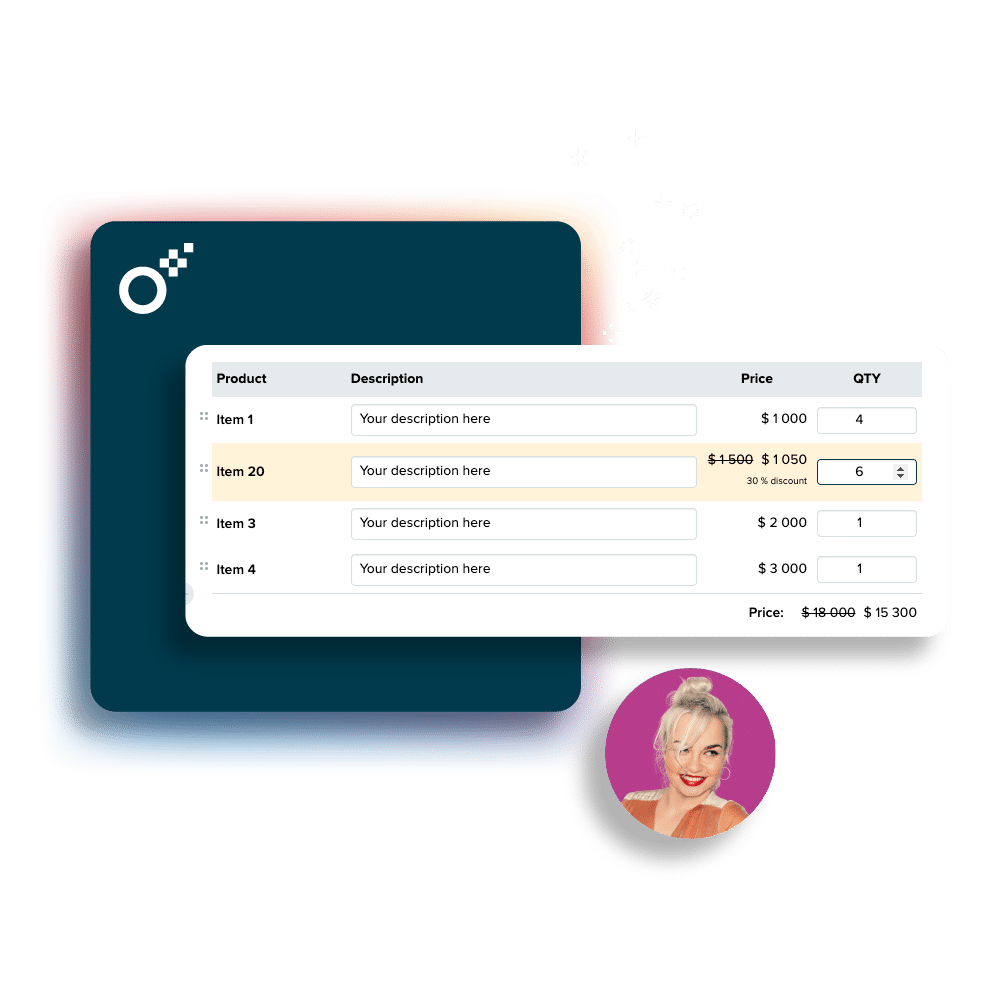
Make contracts interactive for counterparties
Work in interactive contracts that allow counterparties to fill in details, select products, and review terms directly in the document—making it easier to reach an agreement without exchanging documents.

Edit the contract after sending
Keep one up-to-date contract as terms change late in the cycle. Avoid re-sending documents or managing parallel final versions when edits are needed before signature.
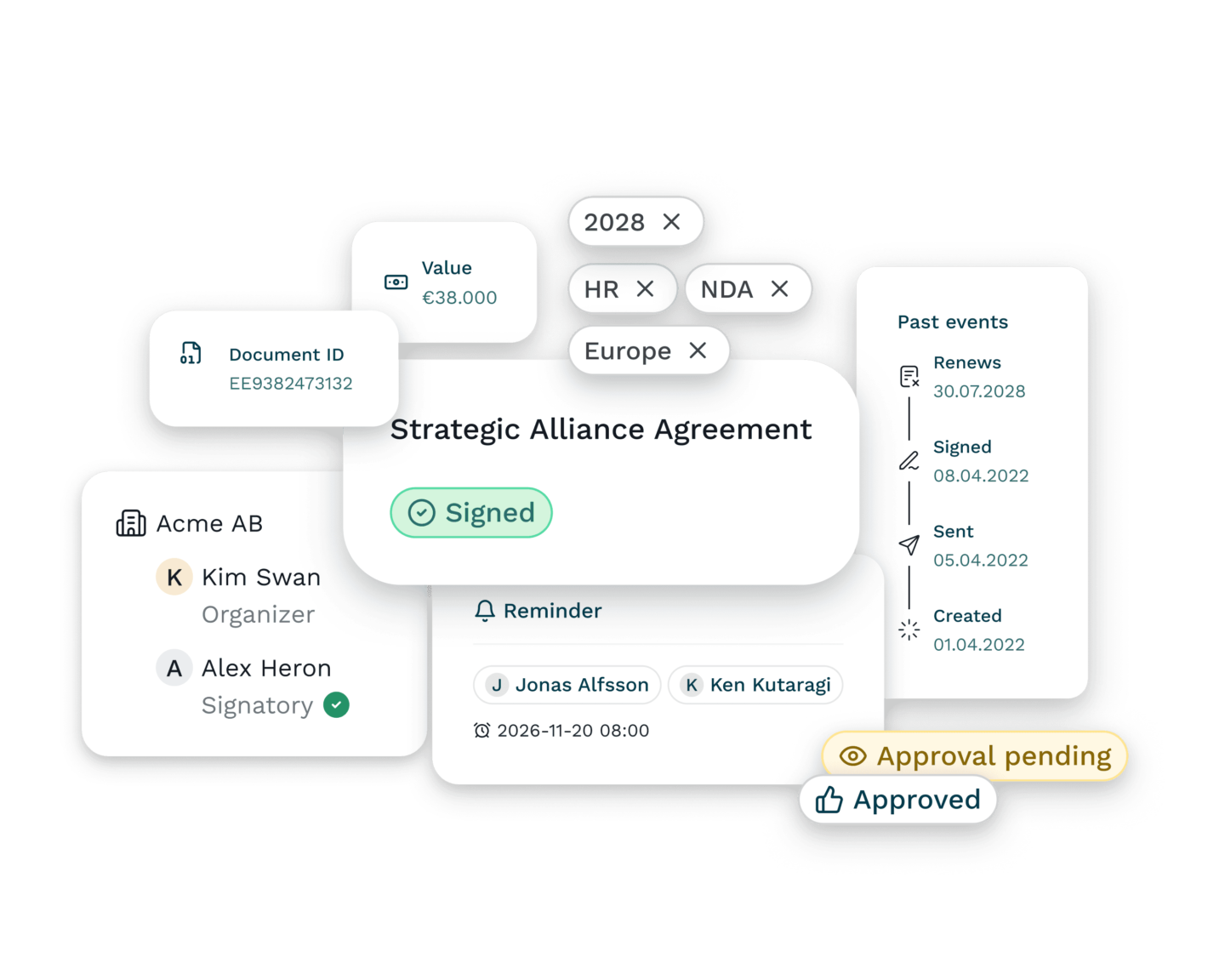
Keep contract data useful after signature
Store signed contracts in one place and keep key terms searchable and actionable after signature, with reminders and follow-ups tied to the same contract record.

Align contract data with connected systems
Sync contract fields with connected systems before and after signature, so teams do not have to re-enter the same data into multiple systems when terms change or when the contract is signed.
“We previously used a traditional e-sign solution but decided to adopt Oneflow’s contract workflow instead, giving us a far more robust & structured contract process that goes well beyond signing. By bringing contract creation, collaboration, execution & post-sign management into a single platform that can be utilized across multiple departments including Sales, HR & Client Management, we expect to improve efficiency, reduce manual work & gain much better visibility across our contracts & trading partner relationships.”

Cecilia Alm, Nordberg Medical
“It keeps all information in one place and HR can easily track the progress.”
Nathalie Formaniewicz, Pabliq
“What really made Oneflow stand out was how responsive they were to our needs and how smoothly the solution could be integrated with our CRM system.”

“It’s amazing. You can move from first contact to contract signature without leaving HubSpot. It’s plug-and-play, and it just works. Honestly, we asked ourselves: is it really this easy?”

“It looked very modern. The way you could brand it, personalise, format the fonts, add in videos and pictures. It looked more exciting than other e-signing platforms we’ve used in the past.”
Read full story
“We’ve seen a huge increase in the amount of communication we’ve had with our customers using Membrain and Oneflow, which has been a great result of the partnership we’ve had and also the sales team actually using the tools on offer now, which we’ve managed to bring to them”

“We can do everything in Oneflow. I can follow my clients in the contract document and keep track of new updates. Most importantly, if something in the contract needs to be changed/updated, I can easily adjust it in Oneflow which saves time and improves customer experience for our clients.”
Read full story
“So that also means that we have everything collected in HubSpot and that’s also important for us since we work with external consultants as well and we need to be able to see the details regarding the contracts. So we have one touchpoint or, one source of information that we go into HubSpot and then Oneflow is already there as well”

“Oneflow is really time efficient, and we know that when we have everything in place with the Pipedrive integration and the templates. They will save us a lot of time since we’ll have several deals that are depending on if they just want our platform, if they need the logistics package, if they want some marketing features or whatever it may be.”

“Before many people at Volue found themselves bogged down by administrative duties, and it took time away from vital areas of the business, such as product development. But now employees can focus on things like upgrading the product or developing a pitch to clients.”

Trusted by thousands to keep their work moving

Built to work with the systems you use

















Compliance you can trust
Your contracts hold your most sensitive business information, so we protect them that way. Oneflow is ISO 27001 and SOC 2 certified and GDPR- and eIDAS-compliant, keeping every contract secure and legally binding. Your data is never shared, never used to train external models and never leaves the EU.

 GDPR
 BankID
 ISO 27001
 MitID
 SOC
 eIDAS
 ISO 14001
 ISO 9001
 TLS 1.2
GDPR
BankID
ISO 27001
MitID
SOC
eIDAS
ISO 14001
ISO 9001
TLS 1.2
GDPR
BankID
ISO 27001
MitID
SOC
eIDAS
ISO 14001
ISO 9001
TLS 1.2
Contracts that power your business
- Experience a personalised demo with a dedicated Oneflow specialist.
- See how Oneflow simplifies contract creation, signing and post-sign management.
- Discover how connected contract data reduces manual work and revenue leakage.
- Explore how Oneflow fits into your existing CRM and business workflows.
Contracts that power your business