Juro has a strong reputation in contract lifecycle management, especially among fast-growing UK companies that want to forget clunky legal tools and endless Word redlines.
And to be fair, it seems like a lot of users like it, with G2 and Capterra ratings averaging at 4.7.
The platform gets praised for its clean interface and for helping make contract management feel less intimidating for commercial teams. But the picture gets more nuanced beyond the star ratings.
Some teams love Juro’s simplicity. Others run into limits around flexibility, pricing transparency, workflows, integrations or scaling contract processes across departments.
That’s what we’re unpacking today.
We’ll look at what verified Juro users actually say, how much the platform costs, where it falls short of expectations, and which Juro alternatives are worth comparing before you commit.
What is Juro?
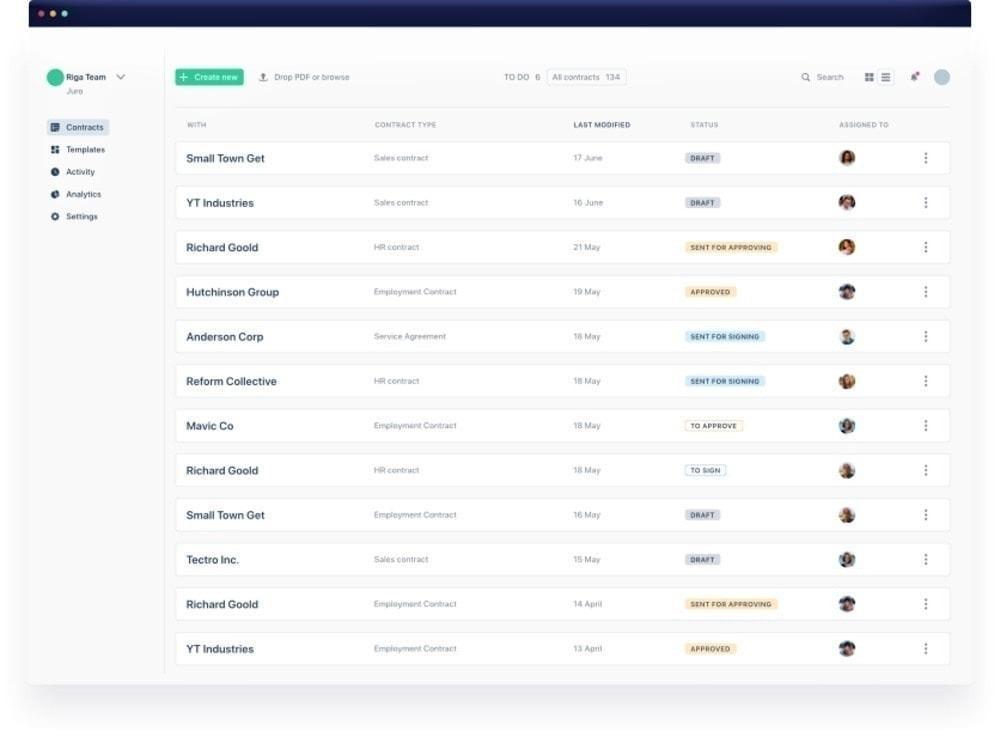
Juro is an AI-native contract lifecycle management (CLM) platform founded in London in 2016 by former lawyer Richard Mabey and Pavel Kovalevich, with primary users being legal teams, sales teams, HR and procurement. The platform covers the contract workflow from end to end: creating contracts, routing them for approval, negotiating terms, signing agreements, storing them in a searchable repository and tracking key dates after signature.
A big part of Juro’s positioning is that contract work should happen inside the tools teams already use. Instead of keeping contracts locked in a separate legal workflow, Juro lets teams initiate and manage agreements through tools like Salesforce, HubSpot, Slack, ATS platforms, Word, Google Drive and other connected systems.
Juro key features
- Contract creation and templates: Juro lets business users create contracts from legal-approved templates. Sales teams, HR teams and other non-legal users can generate contracts by answering guided questions, while legal teams control the underlying wording, fallback positions and approval rules. Templates can include conditional logic, so clauses and terms adjust based on the values the user enters. For example, wording may vary depending on contract type, product, deal value or other business inputs. The platform also supports approval workflows, internal and external comments and conditional logic to help teams move contracts through review faster.
- AI-powered review and negotiation: Juro includes AI features for drafting, review and contract analysis. Its AI Assistant helps create, redraft, summarise and check contract language inside the editor. AI Review can check and redline contracts in Word based on playbooks controlled by the legal team. Juro’s newer AI features include AI Extract and Operator. AI Extract pulls structured data from contracts into reports and table views. Operator lets users query contract data in natural language and get answers with citation links and sources.
- Repository, tracking and integrations: Juro includes a central contract repository where teams can store, search and manage agreements after signature. The platform supports full-text search, audit trails, version control, key date reminders and renewal reminders. Juro connects with tools like Salesforce, HubSpot, Slack, Word, Docusign, Ashby, Greenhouse, Google Drive, Zapier, ChatGPT and REST API workflows. It also supports broader connectivity with productivity platforms through Zapier.
Juro pricing: what to expect
Unfortunately, Juro doesn’t have a pricing page. To get a quote, you need to contact the sales team and share details about your company size, contract volume, required features and integrations.
According to Vendr, Juro pricing is shaped by three main factors: user seats, annual contract volume and feature tier. Implementation and onboarding may also be quoted separately, especially for more complex deployments.
Vendr’s transaction data puts typical annual contract values between roughly $15,000 and $120,000+, depending on scope, with the median buyer paying $31,164 per year.
Smaller teams with five to ten users and fewer than 500 contracts per year commonly see quotes in the $18,000–$35,000 range. Mid-market teams with 10–25 users and 500–2,000 contracts per year typically spend $40,000-$75,000 annually. Enterprise buyers with 25+ users and 2,000+ contracts per year can expect $75,000–$120,000+.
Vendr also notes that implementation and professional services can add another $5,000–$20,000+ to first-year costs, depending on workflow configuration, template migration, integrations and training.
A 20% discount applies if you sign up in the same calendar month as your demo request.
In practice, Juro can be expensive for smaller teams that manage only a few hundred contracts per year. The platform may make more financial sense for mid-market and enterprise teams with enough users, contract volume and workflow complexity to justify the investment. But because pricing is not public, teams need to have a sales conversation before they can properly compare Juro against alternatives.
What users like: the consistent strengths across Juro reviews
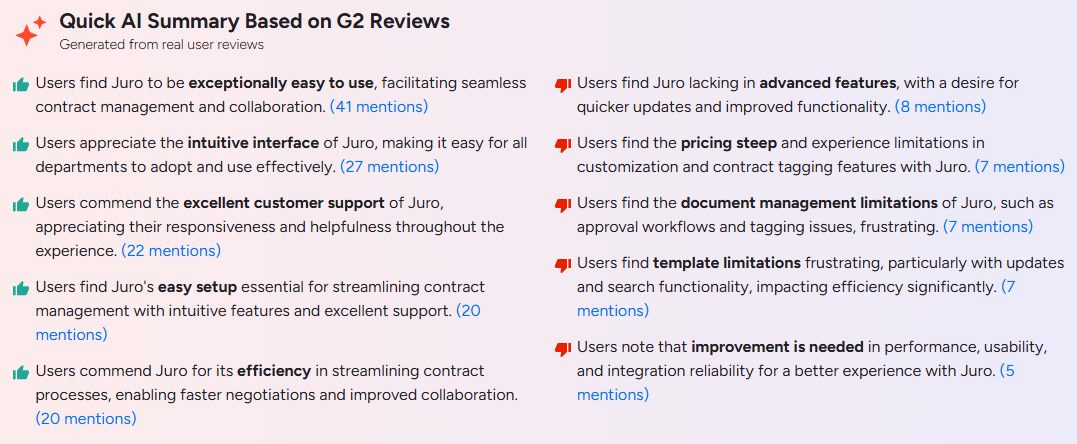
- Ease of use and fast onboarding: More than 40 G2 reviews mention ease of use unprompted. Reviewers describe Juro as easy to learn, straightforward to use and accessible for both legal and non-legal teams. Users also praise the browser-based contract workflow because it keeps drafting, collaboration, signing and contract management in one place. Several reviewers say Juro helps teams reduce back-and-forth, standardise contract creation and make routine contract work easier for business users.
- HubSpot and CRM integrations: HubSpot is one of the strongest integration themes in reviews. One reviewer called the HubSpot integration “the standout,” saying that contracts are generated from deal data in seconds, with two-way sync for line items and pricing. Another reviewer said recent HubSpot bidirectional sync updates had saved hours and were simple to create and update.
- Customer support quality: Reviewers describe the support team as responsive, proactive and useful during onboarding, setup and ongoing product use. One reviewer said live chat queries are answered within hours and that their customer success manager responds quickly. Another said the team regularly helps them get more value from new features.
- Templates, workflows and contract efficiency: Reviewers often connect Juro’s value to speed and standardisation. There are multiple mentions of efficiency, and individual reviews praise Juro for keeping contracts organised from drafting through signature, making templates easier to manage and helping teams centralise contract creation. Users cite template building, approval workflows, conditional logic, internal and external comments, native eSignature and audit trails as practical strengths.
- AI-assisted contract workflows: 2025 and 2026 reviewers rate Juro’s AI tools higher than earlier users. One user said the new AI features feel genuinely useful for in-house legal teams and help make contract work more efficient. Another praised the AI integration for pulling the information they need from contracts quickly.
Where Juro falls short: common complaints in user reviews
- Limited mobile experience: Mobile is a clear issue in at least one recent review. The reviewer said Juro has no responsive mobile experience and no near-term commitment to address it, which makes approvals harder to handle on the move.
- Complex negotiations are constrained: Juro appears to handle standard collaboration and negotiation well. Reviewers praise internal and external commenting, centralised negotiation trails and the ability for counterparties to redline and comment directly in Juro. The limitation appears when negotiations become more complex. One reviewer said Juro doesn’t support redline-over-redline workflows, which limits its usefulness for multi-round negotiations. Another summary notes that Juro lacks advanced features like contract layout and conditional formatting.
- Template and workspace limitations: Templates are both a strength and a source of friction. Users like Juro’s template builder and conditional logic, but several reviews mention limitations around setup and maintenance. Reviewers note that sharing templates across workspaces could be easier, building workflows and smart fields can be time-consuming, and dragging smart fields can feel cumbersome. Others mention that Word formatting doesn’t always transfer cleanly into Juro and that table customisation can feel limited.
- AI accuracy and consistency: Juro’s AI features are useful, but not perfect. One reviewer said the playbook review feature helps flag basic points, but its accuracy is inconsistent. The same reviewer said AI Extract works but is limited and can occasionally misidentify or mislabel clauses. It may still be a time-saver for low-risk, high-volume work, but for high-stakes or unusual contracts, legal teams should expect to review AI output carefully rather than treating it as final.
- Search, reporting and integration gaps: One reviewer said in-page contract search had been unreliable. Another wanted a better search for specific clauses within existing contracts. Others mentioned the need for reporting improvements, deeper Google Docs support, stronger HubSpot mapping and better signing notifications.
- Opaque pricing: Some users see pricing as steep, so buyers should validate the full cost based on users, contract volume, integrations, implementation and renewal terms before committing.
Who is Juro for?
Juro is best suited to mid-market companies where legal owns the contract process, business teams need to self-serve routine agreements, and the company already works heavily from HubSpot or similar CRM-led workflows.
If the core problem is routine contract volume (too many approvals pending, too many standard contracts routed through legal, or too many documents created outside approved templates), the platform can address that well.
The limitations become more visible when teams need advanced negotiation workflows, mobile approvals, highly complex templates, deep clause-level search, more mature reporting or fully reliable AI extraction across unusual third-party agreements.
That matters because contract value is often lost after signature, not just during drafting. World Commerce & Contracting’s research finds that poor contract management erodes nearly 9% of annual value on average. The question is not only whether a CLM platform helps contracts get signed faster, but whether it keeps contract data connected and usable after execution.
Juro vs other contract management platforms: how does it compare?
Oneflow
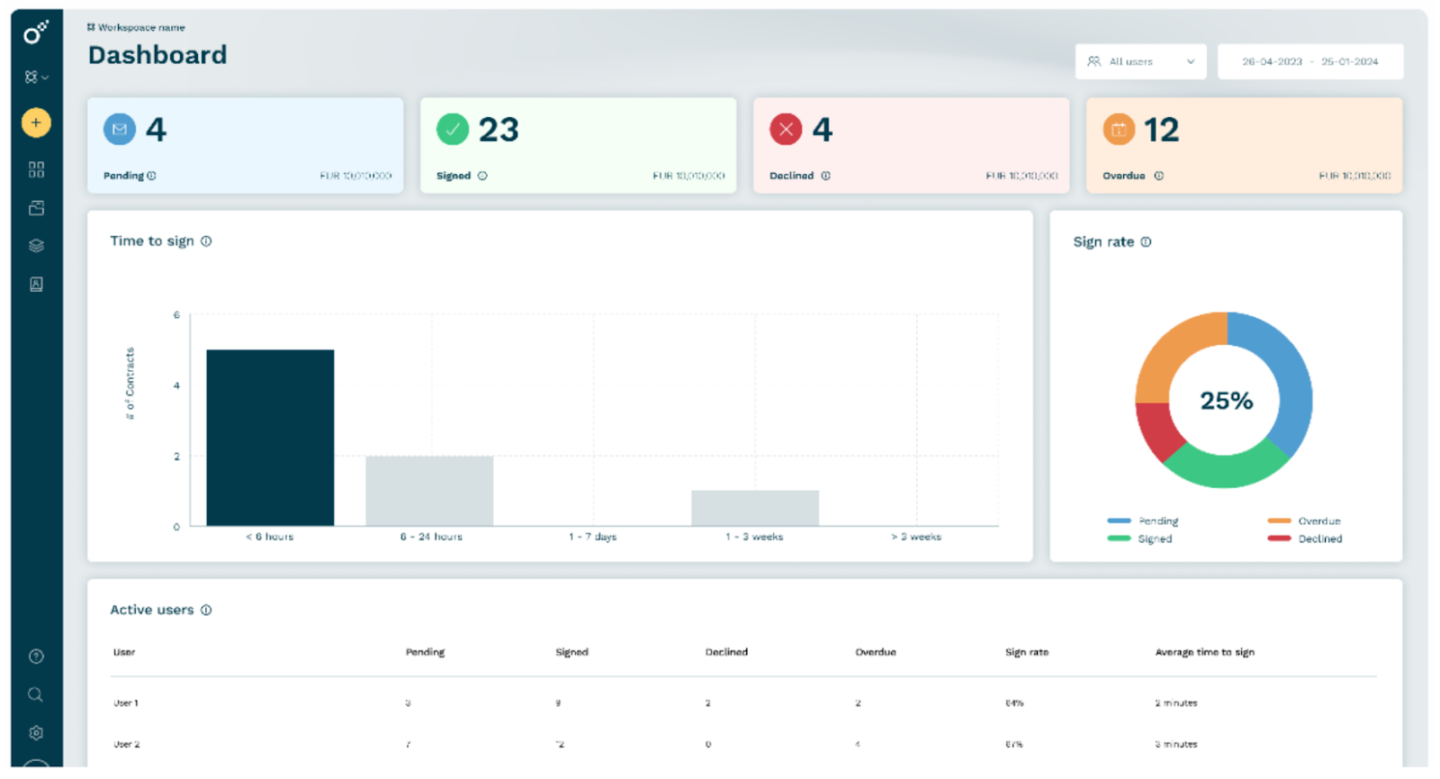
Oneflow is the strongest alternative if you want contract management to extend into the systems where revenue, procurement and HR work actually happen.
Contracts are treated as live business data connected across the organisation. Native integrations cover Salesforce, HubSpot, Microsoft Dynamics and Pipedrive, helping teams keep deal data, pricing and counterparty details aligned between the CRM and the contract.
This is especially important after the signature. Instead of treating a signed agreement as a static document, Oneflow keeps contract data connected to business workflows, with lifecycle rules, automated notifications, approvals, audit trails, AI Extract, AI Summary and portfolio-level capabilities available across its plans.
Oneflow is also built for teams that need contract work to keep moving outside the desktop environment. Contracts can be reviewed, shared and signed on mobile devices, which is especially useful when approvals or signatures need to happen quickly.
Oneflow’s pricing is also more transparent. The Business plan starts at £45 per user, per month, billed annually. That works out to £2,700 per year for the starting package. Enterprise pricing is custom and includes additional controls such as SSO, SCIM API, shared templates, user groups, AI Review, AI Insights, section rules and account audit logs.
For UK and European companies, Oneflow’s GDPR and eIDAS compliance, ISO certification and European base are also relevant advantages.
Book a demo to see what connected contract management looks like in practice.
PandaDoc
PandaDoc is a strong fit for teams focused on proposals, sales documents, quotes and eSignature. It’s a better option for sales-led document workflows than for full contract lifecycle management.
The trade-off is post-signature depth. If your main requirement is creating attractive proposals and getting documents signed, PandaDoc may be enough. If you need contracts to stay connected after signature through renewals, obligations, structured contract data and cross-functional visibility, a dedicated contract management platform is likely a better fit.
Teams researching PandaDoc alternatives are often looking for something that manages the contract after it is signed, not just something that helps to get it signed.
Docusign CLM
Docusign CLM is an enterprise platform with strong brand recognition, compliance credentials and a large ecosystem around eSignature and contract workflows.
It’s better suited to larger organisations with the time, budget and internal resources to manage a more involved CLM rollout. For UK companies prioritising speed-to-value, transparent buying and cross-team usability, Docusign alternatives are worth evaluating carefully before committing.
Ironclad
Ironclad is a serious option for large enterprises with mature legal operations teams, complex approval chains and a need for highly configurable contract workflows.
Its strength is its depth, but the trade-off is implementation effort. Teams without dedicated legal ops resources may find that getting business users to self-serve reliably takes more planning, configuration and internal enablement than lighter contract management platforms.
Contractbook
Contractbook is a cleaner, more accessible option for teams that need template automation, simple contract workflows and a user-friendly interface.
It can work well for straightforward commercial agreements and smaller teams that want to move away from manual document handling. But companies with complex portfolios, heavier post-signature reporting needs, deep CRM requirements or multi-department contract workflows may need a more connected platform.
Juro is good, but is it the right fit for your business?
Juro has earned strong ratings for good reasons. Users consistently praise its ease of use, straightforward onboarding, HubSpot workflows and responsive support. For a mid-market company where legal leads the contract process and the priority is moving away from shared drives, email chains and manual templates without a lengthy implementation, Juro is a strong platform.
However, users flag limitations around mobile access, complex redlining, template management, search, reporting and AI accuracy for less standard documents. Pricing is another consideration: you can’t benchmark Juro properly without speaking to sales first.
For businesses that need contracts to work as connected business data across legal, sales, finance, HR and procurement, with CRM-connected workflows, post-sign visibility and pricing you can review before picking up the phone, Oneflow belongs alongside Juro in your evaluation.
Book a Oneflow demo to see how it compares.
FAQs
Is Juro good for UK businesses that want to manage contracts effectively?
Yes, with some notes. Juro is London-founded and has a strong presence in the UK and European CLM market. It works well for mid-market companies where legal leads the contract process and business teams need to self-serve routine agreements from approved templates.
User reviews consistently praise Juro’s ease of use, onboarding, templates, HubSpot workflows and customer support. The main things you need to watch out for are mobile access, complex multi-round negotiations, template management, Word formatting, AI accuracy and pricing transparency. It’s worth evaluating Juro against your actual contract volume, CRM setup, negotiation complexity and post-signature reporting needs before committing.
Does Juro have AI features for contract creation and editing?
Yes. Juro has AI features for drafting, review, contract data extraction and summarisation. AI Review can redline third-party contracts against legal playbooks. AI Extract pulls structured data from contracts, while Operator lets users query contract data in natural language.
What is the best alternative to Juro for UK businesses?
It depends on the problem you’re trying to solve.
For cross-functional contract management across sales, finance, HR, legal and procurement, Oneflow is the strongest option. It includes transparent pricing, live CRM-connected workflows and stronger post-signature visibility.
For sales document automation, quotes and proposals, PandaDoc is worth considering. For enterprise legal teams with complex workflows and dedicated legal ops resources, Ironclad is a serious contender.
What are Juro’s main limitations according to user reviews?
The main limitations mentioned in Juro reviews are limited mobile access, constraints around complex redlining and multi-round negotiations, Word formatting issues when importing documents, template and workspace management friction, search and reporting gaps, and inconsistent AI accuracy for more complex contract types.
Plus, Juro does not publish pricing publicly, and Vendr data shows quotes vary by user seats, contract volume, feature tier and implementation requirements.
.png?id=40edbc9ee25345a211152388fdcf1fd2)

.png?id=073897979970647cd034d6db96c145de)