Electronic signatures can be legally binding in the UK and across the EU. Whether a particular contract is enforceable depends on who signed it and with what authority, what the parties agreed to and whether they followed any formal execution requirements. An electronic signature does not, by itself, make a contract enforceable.
This guide covers the legal signature requirements UK teams should check under UK law, different EU signature levels and what applies to UK-EU transactions. The detailed discussion concerns England and Wales; Scots law and the law of Northern Ireland have different requirements for certain documents and methods of execution.
This is general information, not legal advice.
Are electronic signatures legally binding in the UK?
Generally, yes. The 2019 Law Commission report on electronic execution confirms that a person can execute an electronic document, including a deed, if they intend to authenticate it and meet the applicable formalities. Typing a name at the end of an email or deliberately clicking an acceptance box can qualify as a signature in the right context.
Whether an electronically signed contract is valid and enforceable depends on more than the signature itself. The parties must agree to the same terms, anyone signing on behalf of a business must have the necessary authority and certain documents must be witnessed or meet other execution formalities. If a dispute arises, the business may need evidence linking the signing action to the signer and to the final version.
A valid signature is not the same as a valid contract
Before relying on the signed document’s legal validity, check three things:
| Question | What it establishes | Example |
|---|---|---|
| Did the person sign? | Did the person take an action intended to authenticate this document? | A typed name, deliberate click or electronic signature. |
| Is the agreement effective? | Were the terms agreed on and any required execution steps completed? | An authorised signatory accepts the final terms; a deed is witnessed where required. |
| Can you show what happened? | Can you attribute the signing action to the person and identify the agreed version? | An audit trail records the signer’s details, authentication steps, timestamp and document version. |
Before sending a document, confirm the signatory’s authority and check for execution formalities. After signing, keep the final version with all related messages and audit trail. Those records may help establish what was agreed on if the agreement is later challenged.
Which electronic signature laws apply?
Several sources of law address different parts of electronic signing:
- Electronic Communications Act 2000: Section 7 allows an electronic signature to be admitted as evidence of authenticity or integrity in legal proceedings. Signature admissibility does not decide whether the agreement is valid.
- UK eIDAS: This legal framework for electronic identification and trust services defines electronic signatures and regulates trust services. According to the ICO, a qualified electronic signature (QES) has the same legal effect as a handwritten signature.
- Common law and document-specific rules: Courts look at the circumstances to decide whether the person intended to sign. Some documents must follow formal steps set by law. The contract may also specify how amendments must be signed and who can sign them.
The UK has three legal jurisdictions: England and Wales, Scotland and Northern Ireland. Each has its own rules for executing certain documents, including when signatures must be witnessed. If Scots law or Northern Irish law applies, confirm the local requirements before using an electronic signature.
Legal signature requirements (UK)
There is no single electronic signing method that works for every document. Check the legal requirements for the document first, then choose a method that provides enough evidence for the level of risk involved.
| Factor | Legal requirement or practical safeguard? | Why it matters |
|---|---|---|
| Intention to authenticate | Necessary when the action is relied on as a signature. | Shows that the person meant to sign the document. |
| Agreement to the terms | Required for contract formation. | Establishes which terms the parties accepted. |
| Authority and capacity | Governed by the underlying law. | A signature alone does not prove that the person had authority to sign on behalf of an organisation. |
| Document formalities | Apply to certain documents. | The rules may prescribe witnesses, wording, delivery or registration. |
| Signer identification | Depends on the consequences if the signature is disputed and any requirements imposed by law, a regulator, the receiving authority or the contract itself. | Helps connect an electronic signature to the person signing. |
| Final version integrity | Usually an evidential safeguard. Also required for advanced and qualified signatures and certain registration procedures. | Shows what was signed and whether it changed. |
| Audit records | Usually evidential, rather than a universal validity rule. | Record the signing process if the executed documents are challenged. |
| Retention and access | Depend on the agreement type and applicable rules. | Preserve the agreement and evidence for later use. |
Ordinary commercial agreements
In England and Wales, most routine commercial contracts do not have to be signed in a prescribed way. Scotland and Northern Ireland have separate legal systems, so confirm which law applies before signing. Also check who has authority to sign for each organisation and whether an existing agreement names the required signatories. With remote signing or an e-signed PDF, retain the entire signed document, not just the signature page.
An email address, IP address or SMS code may help connect the signing action to a particular person, but none proves that person’s legal identity on its own. Use stronger identity checks when required by the recipient or when a disputed signature could have serious consequences.
Deeds and witnessed signatures
For a deed signed by an individual in England and Wales, the witness must be physically present when the individual signs. Watching through a video call is not enough under the Law Commission’s statement of the law. The individual and witness may both sign electronically, but the witness must then add their own signature to confirm that they witnessed the signing.
A company can execute deeds through two authorised signatories, such as two directors or a director and the company secretary, without a witness. Alternatively, a director can sign before an attesting witness. The deed must also be delivered, meaning the person or company intends it to take effect. A QES cannot replace these steps.
Land registration and copies of signed documents
For a property document submitted in England or Wales, ask the conveyancer which route HM Land Registry accepts before signing. Practice Guide 82 covers a wet-ink signature page returned with the final document (the Mercury process), conveyancer-certified electronic signatures, and simple signatures on specified Land Registry forms.
Section 91 of the Land Registration Act 2002 allows certain land transactions to be completed using an electronic document. If the section’s requirements are met, the document has the same legal effect as a deed without requiring a witness.
A photograph of a signed paper document or a scanned signature page may be useful evidence, but it does not show which complete version was signed. Keep the entire document and any emails or platform records linking the signature page to that version. For a Land Registry filing, follow Practice Guide 82 rather than assuming any scan will be accepted.
Signing records can contain personal data. For an ID document, phone number or IP address, follow the ICO’s data minimisation guidance and set a suitable retention period. UK GDPR concerns data handling, not contract validity.
Are electronic signatures legal across the EU?
Yes. Under Article 25 of EU eIDAS, an electronic signature cannot be denied legal effect or admissibility as evidence solely because it is in electronic form or does not qualify as a QES. This rule does not make every electronic transaction enforceable or oblige every public authority to accept every electronic format.
EU eIDAS and UK eIDAS are separate frameworks, so that a UK-EU transaction may need checks in both jurisdictions.
Simple, advanced and qualified electronic signatures
EU eIDAS distinguishes three levels of electronic signature. A digital signature is a cryptographic method that can be used to implement an electronic signature; other forms of electronic signature, such as a typed name or deliberate click, do not necessarily use that technology. The European Commission’s eSignature guidance explains the requirements for each level.
| Level | What it involves | EU legal effect | When to consider it |
|---|---|---|---|
| Simple electronic signature (SES) | Electronic data used by the signer to sign, such as a deliberate click or typed name. | It cannot be denied legal effect or admissibility solely because it is signed electronically or not qualified. | A routine agreement where neither the law nor the recipient requires AdES or QES, and basic evidence linking the signature to the signer is sufficient. |
| Advanced electronic signature (AdES) | A signature uniquely linked to and capable of identifying the signer, created under their control and linked to the data so later changes can be detected. | The same non-discrimination rule applies, with stronger technical evidence. | An agreement where stronger evidence of the signer and signed version is needed. |
| Qualified electronic signature (QES) | An AdES created using a qualified signature creation device and a qualified certificate issued by a qualified trust service provider. | It has the equivalent legal effect of a handwritten signature in EU member states. | A transaction where the law or recipient requires QES, or where the parties choose that level of assurance. |
These levels apply to the signature, not the whole contract. A company’s qualified electronic seal concerns data origin and integrity, not an individual’s QES. A QES does not replace a required witness, notary or filing step.
National law and eIDAS in the European Union
eIDAS sets common rules for electronic signatures and qualified trust services across EU countries, including services that issue the certificates used for qualified signatures. It does not replace each member state’s laws on contracts, property, employment or company documents, or its procedural rules. National law may determine which type of signature a particular document requires and whether it also requires a witness, notary or a prescribed form. An authority receiving the document can set conditions for electronic submission.
The 2024 amendment, Regulation (EU) 2024/1183 (eIDAS 2.0), expands the rules for digital identity. The European Commission states that the member states must provide EU Digital Identity Wallets by the end of 2026. The wallets will let people present verifiable identity information and create qualified electronic signatures. The amendment also regulates the remote management of qualified signature creation devices: a qualified provider can manage the device used to create a QES without the signer holding it.
These changes do not require a QES for every business contract. Simple and advanced electronic signatures remain available where the document’s rules and any receiving authority allow them.
How do electronic signatures work in UK-EU transactions?
Use these steps to choose the appropriate signing method and signature type for an agreement between a UK business and an EU counterparty:
- Establish the governing law. Check which law applies to the agreement. If the document must be filed or registered, note which authority will receive it, as they may set separate rules.
- Identify the document type. A routine supply agreement has different signing rules from a deed or an official filing.
- Check the requirements. Read the legal rules for that document, the receiving authority’s submission instructions and any signing terms the parties have agreed to.
- Choose who signs and how. Confirm that each person is eligible to sign. Check whether a particular signature level, witness or notary is required before choosing the method.
- If using QES, check the provider. Check that both the provider and the service issuing the signature certificate are qualified on the relevant EU or UK trusted list.
- Finalise and keep the records. Arrange the required witnessing or notarisation when signing. Afterwards, complete the delivery or registration steps and keep the final signed version, along with records of the signing process.
After Brexit, the UK kept an amended version of eIDAS. The ICO explains that EU-qualified trust services remain recognised in the UK, but UK-qualified services are not automatically treated as EU-qualified. If you need an EU QES, check the provider and its certificate-issuing service on the EU Trusted List Browser. For UK-qualified status, use the ICO’s UK Trusted List.
How Oneflow supports electronic signing across the UK and EU
Once you have checked the signing rules for your document, you can prepare it and collect internal approvals in Oneflow before sending it to the signers. If a simple electronic signature (SES) is suitable, you can sign with a click, an SMS code or a name drawn or typed on screen. An SMS code provides evidence that someone had access to the nominated phone, but it does not establish their legal identity. If you need an advanced electronic signature (AdES), you can use a supported electronic ID; selected eID providers also support qualified electronic signatures (QES).
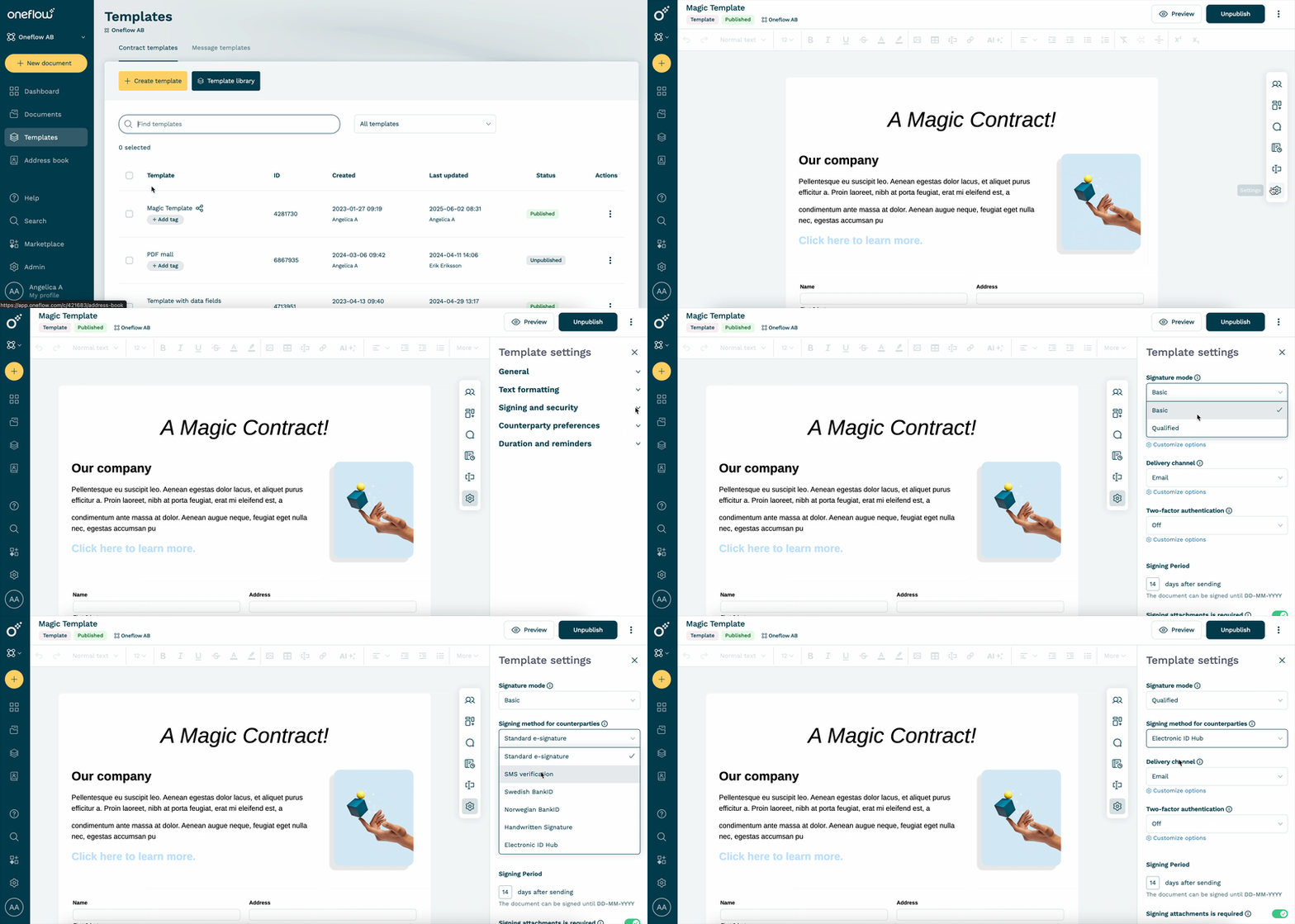
For QES, activate an eligible provider and set a template to qualified signature mode before creating the document. You cannot mix QES with SES or AdES in one document, or change the signature type after sending it. Check the provider’s qualified status and any separate witnessing or filing rules before you send the document.
After you send a digital contract, you can still discuss it with counterparties and edit it before everyone has signed. If you change the text after someone signs, Oneflow resets all signatures, so each party must sign the revised version. Once everyone has signed, the document is locked, and you need a new document for any later amendment. You can review what changed during signing in the audit trail.
You can then download the signed PDF with its audit trail and digital certificate. Oneflow seals the PDF so you can check whether it was tampered with after signing.

After signing, you can set renewal reminders in Oneflow and sync contract data to other business systems.
Pricing starts at £45 per user per month with annual billing and a five-user minimum. To check which signing methods and eID providers are available for your documents, book a demo.
FAQs
Is a typed, scanned or photographed signature legally binding?
A typed name or a picture of handwriting can be a signature if the person intended to authenticate the particular document. A photograph of a signed paper page can be evidence of signing, but it may be hard to show which complete document it belongs to. Keep the complete signed document as one file. If the signature page is stored separately, also retain the email or platform record showing which final version it belongs to. For a Land Registry submission, follow its process for said document type.
Does UK eIDAS still apply after Brexit?
Yes. The UK retained and amended its eIDAS framework. EU-qualified trust services remain recognised in the UK, but UK-qualified services are not automatically treated as EU-qualified.
When is a qualified electronic signature required in the EU?
No EU-wide rule requires QES for every business contract. Check the document’s national law, the receiving authority’s rules and the parties’ own terms. QES has handwritten-signature equivalence under EU eIDAS, but other formalities can still apply.
Which UK documents need wet ink or additional formalities?
Ordinary contracts can often be signed electronically. Deeds need their execution steps, including a physically present witness when an individual signs with a witness. Wills in England and Wales remain subject to separate formalities; a 2025 proposal for electronic wills is not a general enacted signing route. HM Land Registry accepts specified electronic processes for specified documents. Check the precise requirements for a power of attorney, statutory declaration or court filing before using a standard signing flow.
.png?id=40edbc9ee25345a211152388fdcf1fd2)

.png?id=073897979970647cd034d6db96c145de)