
The State of Contract Management Pains
How to combat top contract management challenges

When you think of contracts, what comes to your mind?
Contract management is the most critical part of running a business. Get it right, and you’ll stay on top of compliance, avoid unnecessary headaches, and close deals in the blink of an eye.
We have surveyed 200 business professionals, and identified three major contract pain points: manual work, GDPR and data privacy compliance, and the friction that comes with using multiple systems. These issues are holding businesses back, causing delays in finalizing contracts and making it hard to keep up with shifting legal requirements.
In this report, we’ll break down each pain point, look at how they impact businesses, and share practical solutions to combat them head-on.


Briefly about contract management
Contract management is the process of handling agreements made with other parties, covering the entire contract lifecycle – from pre-sign to post-sign – including renewal, renegotiation, execution, compliance, and storage.
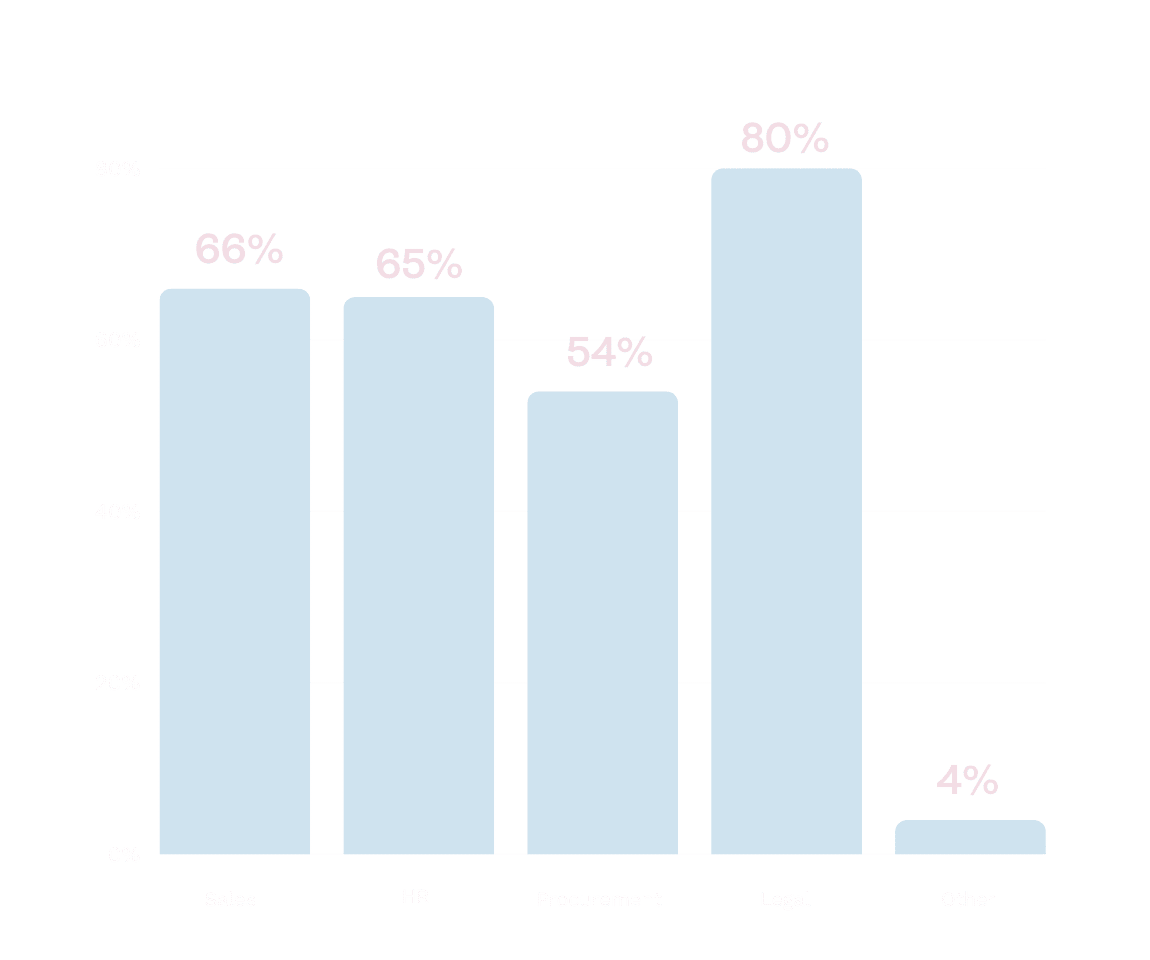
Who are experiencing pains in contract management?
Over 300 business professionals across two continents and seven countries have told us about their pains and challenges in their contract management.
A lot of pains stem from manual contract management
GDPR compliance is a big challenge
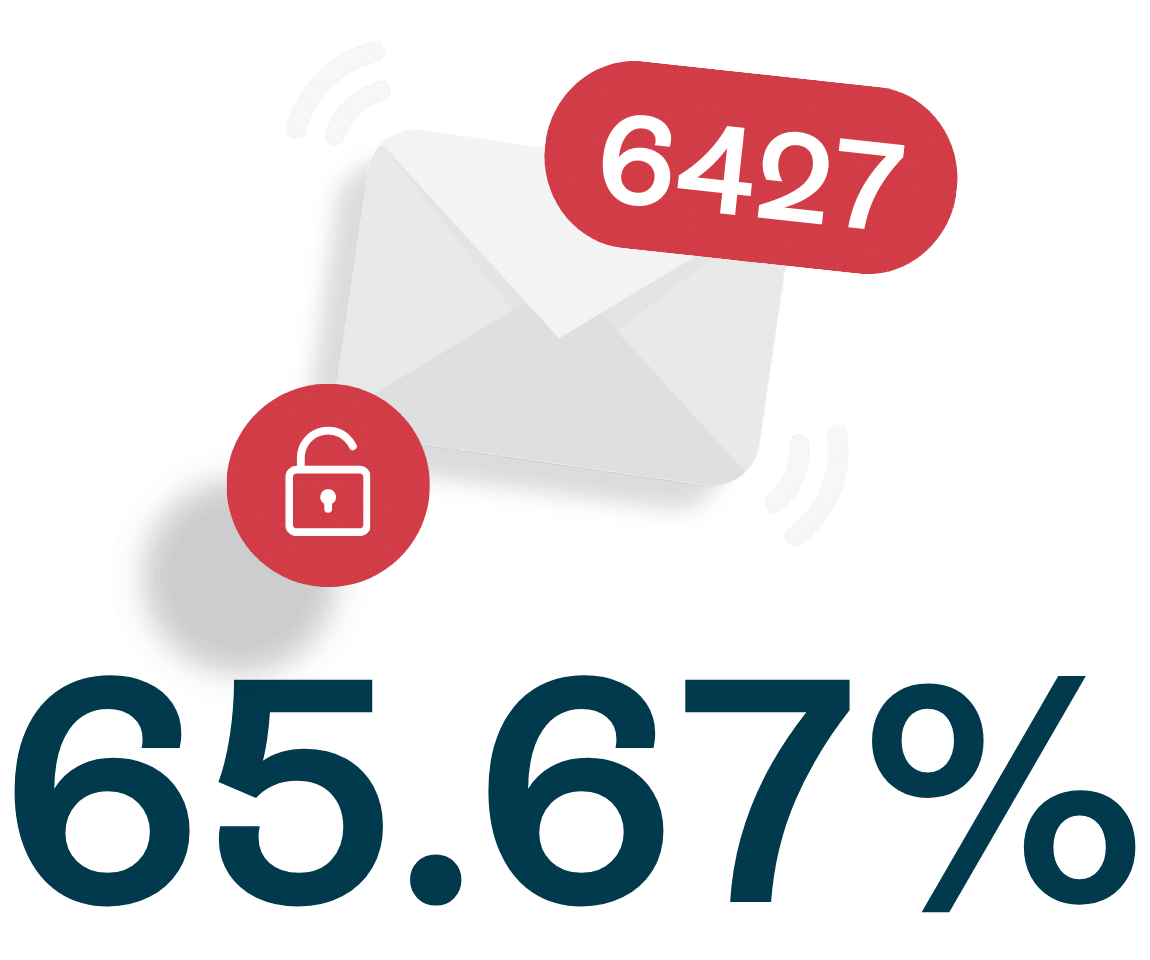
65.67% of businesses use email to review contracts, raising security concerns. Additionally, 17% store finalized contracts on local drives, leaving sensitive data at risk of non-compliance with GDPR.
System friction slows down the contract process
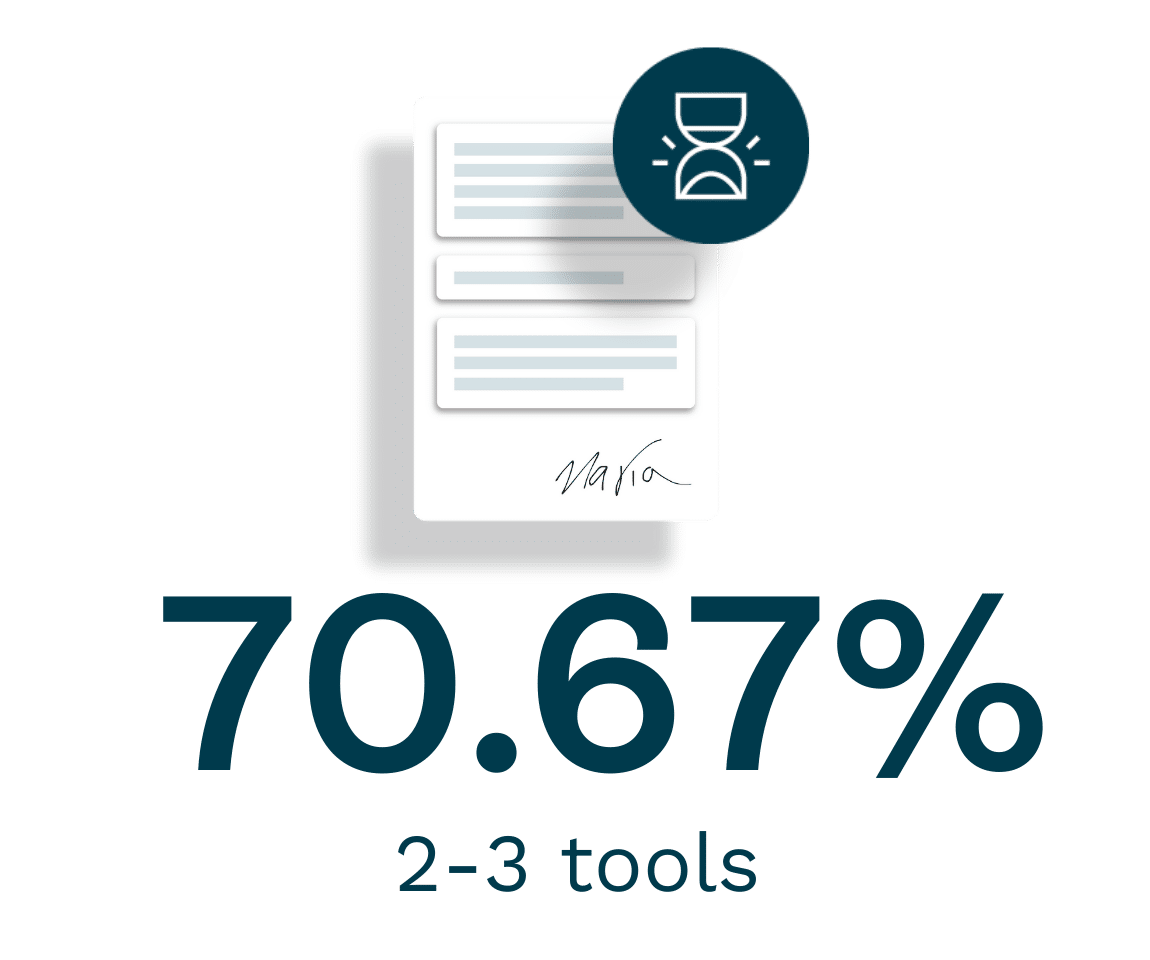
70.67% of businesses use 2-3 different tools to manage contracts, causing delays and confusion. 39.67% of businesses take 1-2 weeks to finalize a contract, while 7.33% report it taking over 4 weeks.
3 most common pain points in contract management

Manual work leads to delays and misunderstandings

Staying on top of GDPR and data privacy

The friction of switching between multiple systems
Manual work leads to delays and misunderstandings
One of the most time-consuming aspects of contract management is the sheer amount of manual work involved.
The process typically begins with drafting contracts in word processors like MS Word or Google Docs (66% of businesses), only to later freeze the document as a non-editable PDF for signing.
This creates a huge inefficiency: businesses end up juggling multiple tools to create, finalize, and store contracts, leading to confusion and delays.
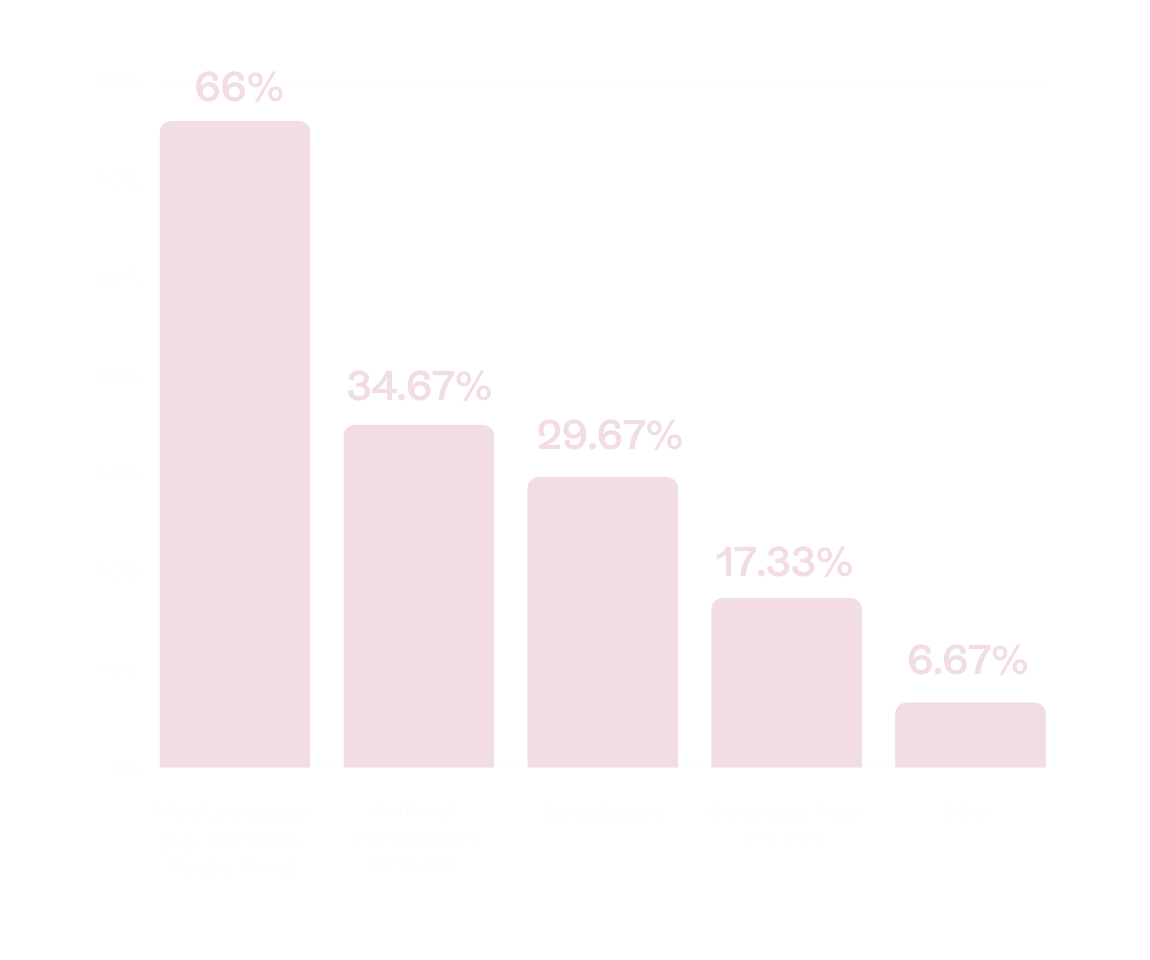
How do you primarily create contracts?
65.67% of respondents use email to review, comment, and agree on contract terms. This method not only increases the risk of errors but also complicates the task of tracking document versions. With no real-time collaboration, it’s often unclear who is working on the latest version of a contract or even what changes have been made.

Pro tip!
If you are using word processors and sending your contracts as PDFs, find a tool where you can add interactive form fields on top of the PDF so that you don’t have to back and change the document when your counterparty wants to fill in their information. See how it’s done.
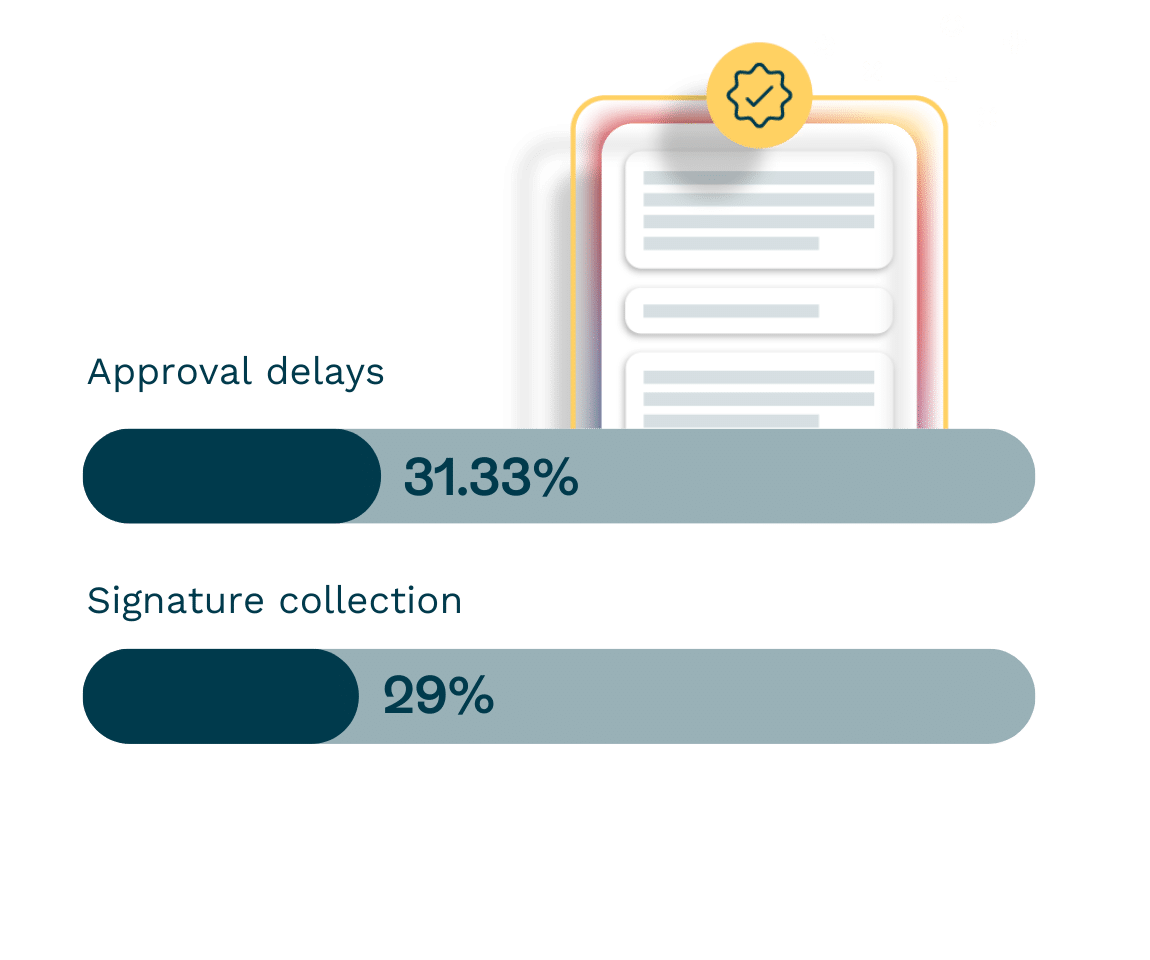
Approval delays hinder contract finalization
31.33% of businesses identified approval delays as one of the top obstacles in getting contracts finalized quickly. These delays often occur when multiple stakeholders are involved, making it difficult to get timely approvals and move contracts forward.
Signature collection is another challenge for 29% of businesses. Even though digital signatures are widely used, the process can still be delayed if there are issues with obtaining signatures or if the right individuals are unavailable to sign on time.
Pro tip!
Another thing that might be slowing down your approvals and signing process is the constriction of signing orders. Signing orders are great so you know which users need to sign in what order, but make sure your tooling still allows you to add or remove participants once the signing order is set.
Lack of version control causes errors
Document version control remains a struggle for 18.33% of businesses. Without a clear, centralized system to track revisions, teams often work off outdated versions of contracts, leading to confusion and errors.
Lastly, 18% of respondents cited problems with the storage and retrieval of contracts, highlighting the difficulties in locating and managing finalized contracts, especially when they are stored in different systems or formats.
There’s still room for faster contracts
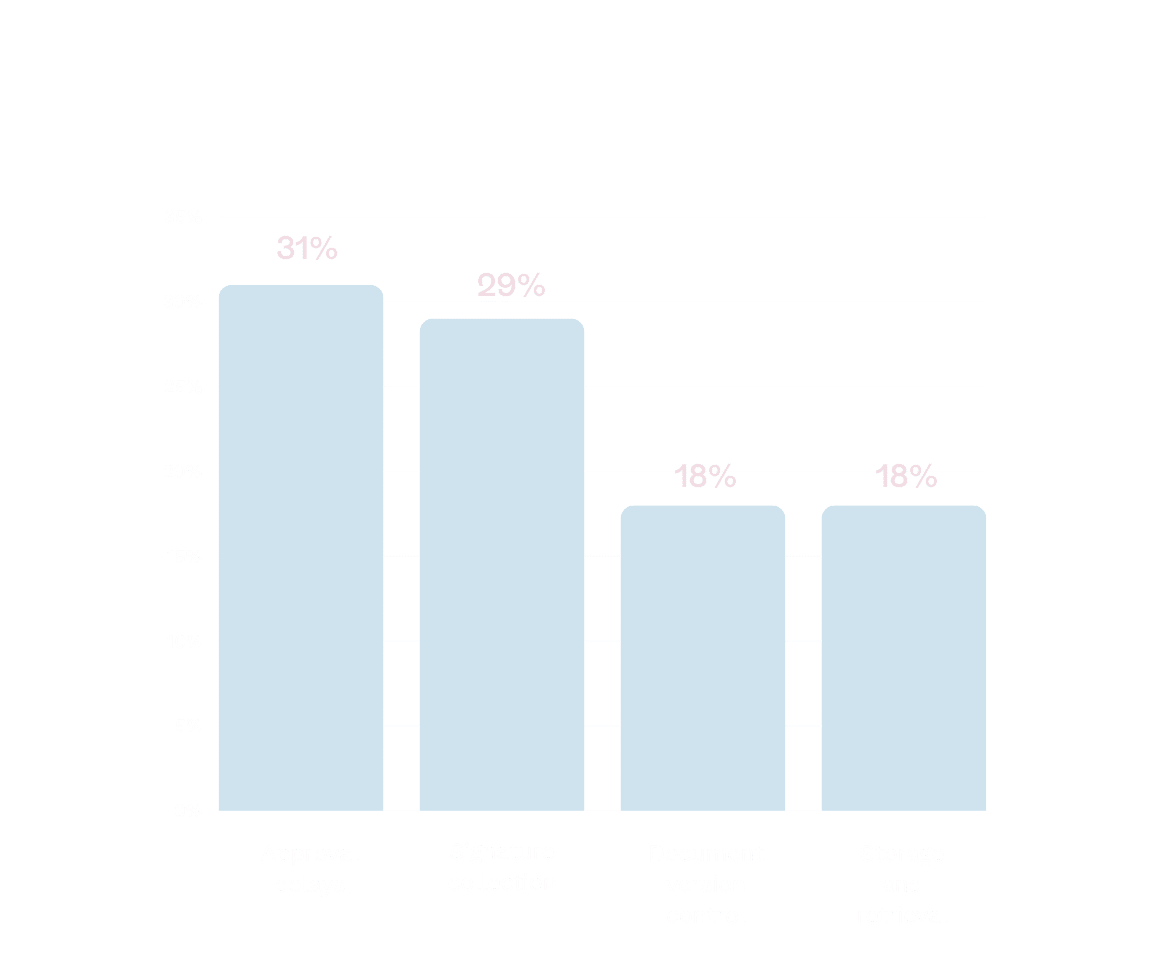
What is the biggest challenge in your current contract process?
Risk of expired contracts with manual tracking
32.67% of businesses manually track expiration and renewal dates.
One of the often-overlooked challenges in contract management is keeping track of contract expiration and renewal dates. With manual processes in place, it’s easy for these important dates to slip through the cracks, leading to missed opportunities or compliance issues.
In fact, 32.67% of businesses manually track expiration and renewal dates, while 58.33% use automated reminders to keep on top of them. But for 9% of businesses, this is still a blind spot, meaning contracts may go unnoticed or expire without any follow-up.
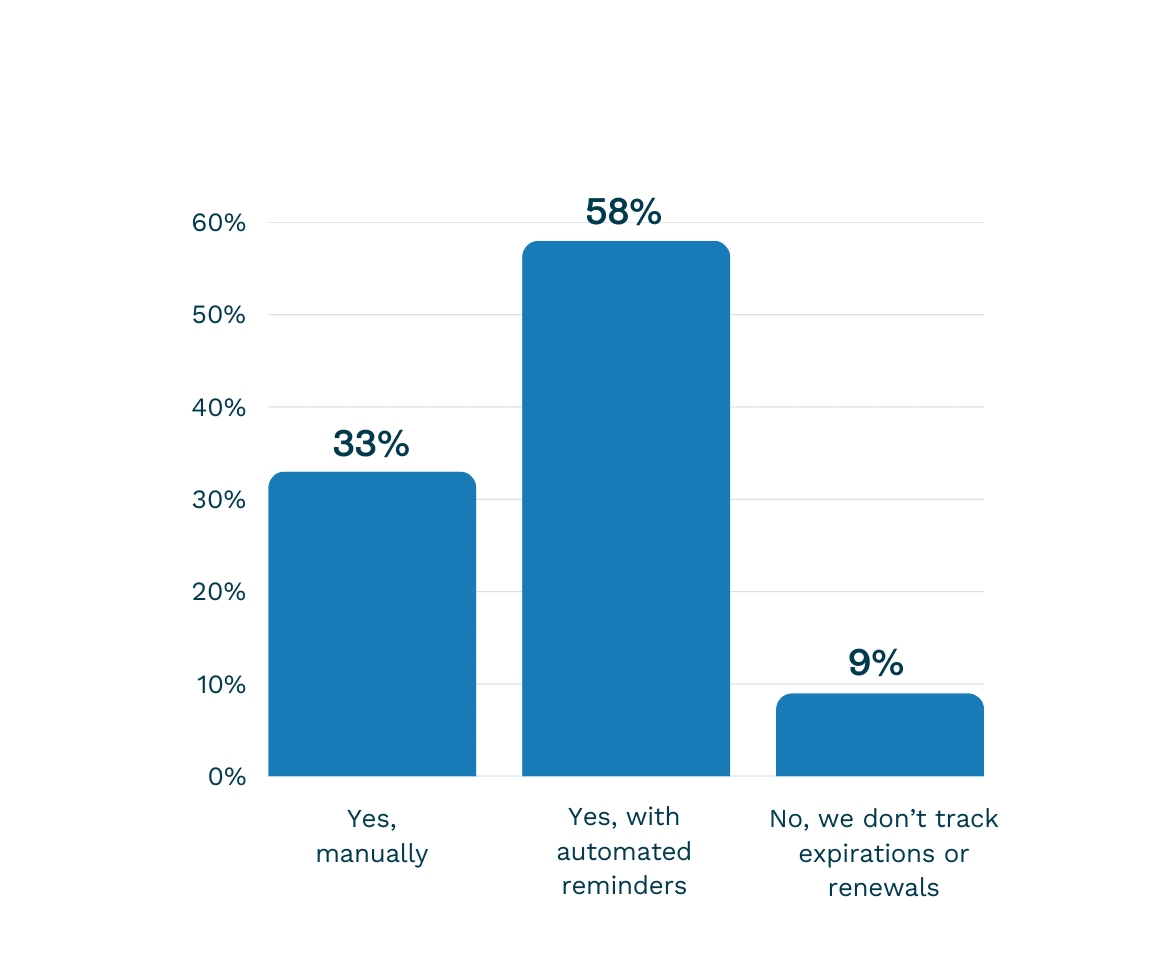
Do you track contract expiration and renewal dates?

Combat your pain:
Automate the contract management workflow
A contract management tool helps combat manual work by automating key tasks throughout the contract lifecycle. By using HTML format—like Google Docs—Oneflow allows real-time collaboration, showing who made changes and making sure everyone is working from the latest version. This collaboration prevents version control issues and keeps teams aligned, reducing the need for manual updates and back-and-forth.
With automated reminders and approval workflows, the system speeds up the process, so contracts are reviewed and signed on time—like magic. Additionally, the system automatically tracks important dates like contract renewals and expirations, removing the need for manual tracking and preventing any deadlines from being missed.
Staying on top of GDPR and data privacy
As companies manage more sensitive customer data, data privacy and compliance with regulations like GDPR have become more critical than ever.
Contracts often involve the exchange of personal data, and when sent via unsecured methods like email, the risk of breaching privacy laws increases.
As mentioned before, 65.67% of businesses still rely on email to review and sign contracts. This opens up numerous security concerns, as personal data could be sent to unintended recipients, stored on insecure systems, or exposed during the review and approval stages.
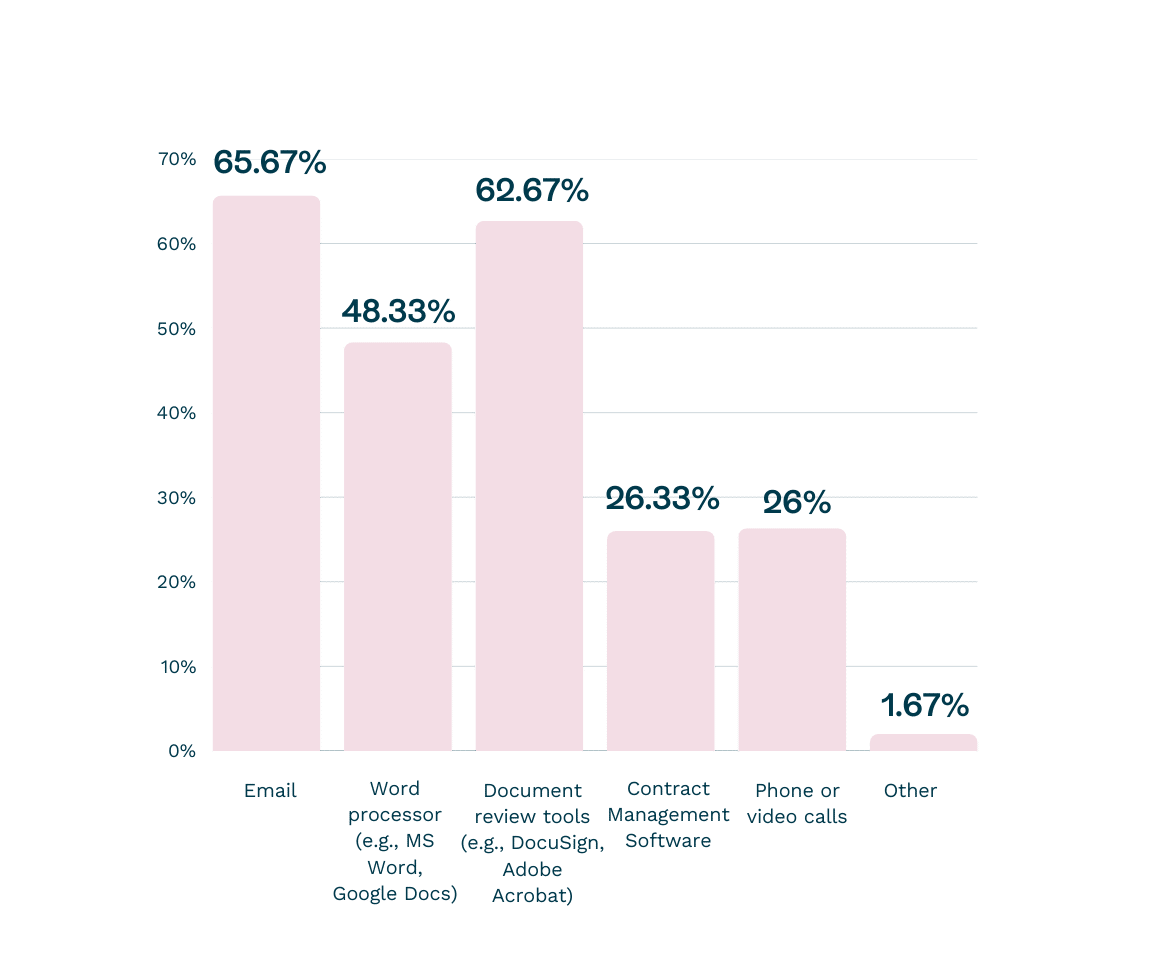
Which tools or platforms do you use for reviewing, commenting, and agreeing on contract terms before signing?
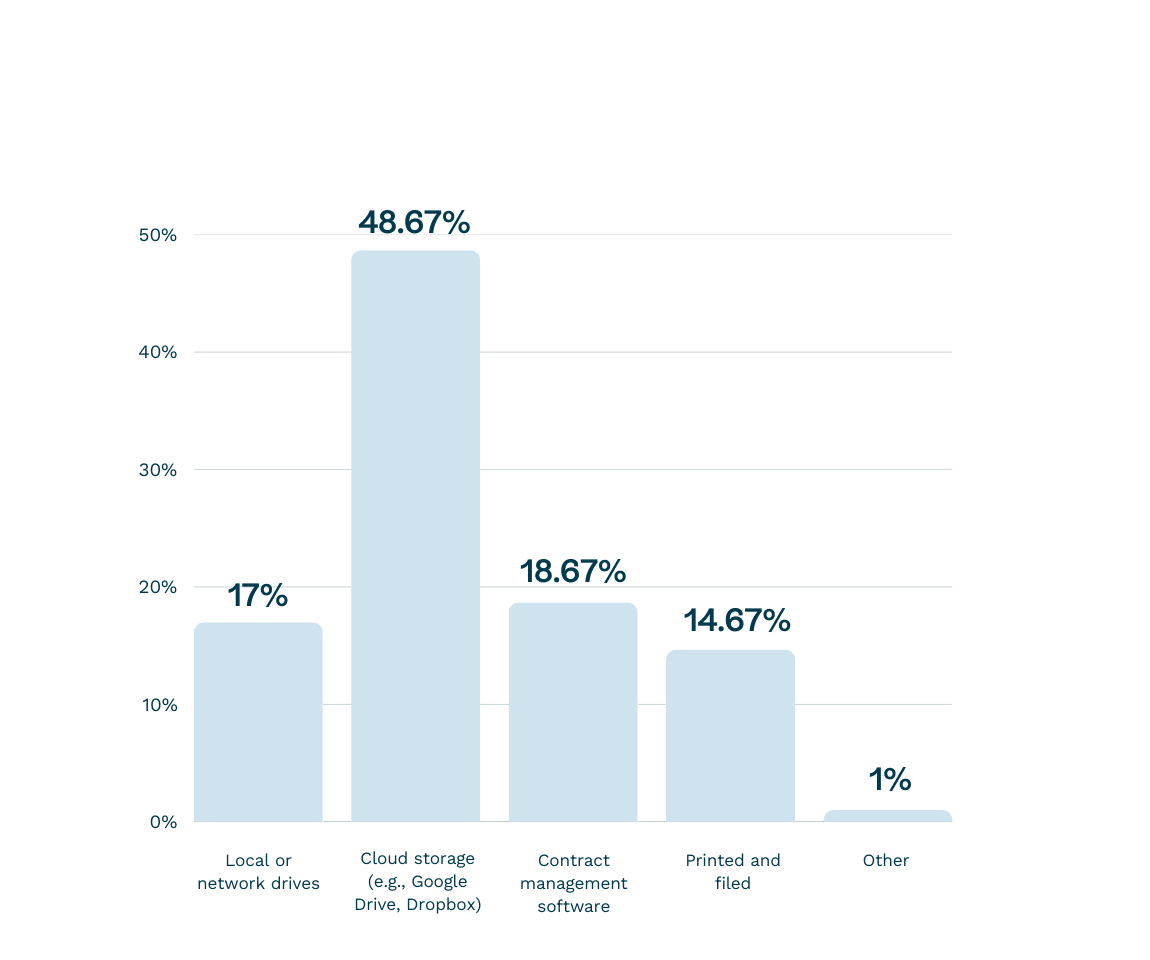
Where do you typically store finalized contracts?
Scattered data puts your compliance at risk
One of the key components of GDPR is the requirement to prove that personal data has been deleted when requested. But how can businesses make sure this happens when contracts containing personal data are stored across multiple systems?
The risk of non-compliance grows when contracts are stored in places like local or network drives (17%). Even businesses using cloud storage (48.67%) or contract management software (18.67%) still face risks if these systems are not properly integrated or managed, leaving gaps in security and compliance.
For the 14.67% of companies that store contracts physically in printed and filed formats, the challenges are even greater—properly destroying or deleting all copies of a contract is nearly impossible without a comprehensive digital solution. Fragmented systems can lead to gaps in compliance, especially when information is stored in disconnected silos, making it harder to track the data’s lifecycle.

Manual contracts increase your legal and compliance risks
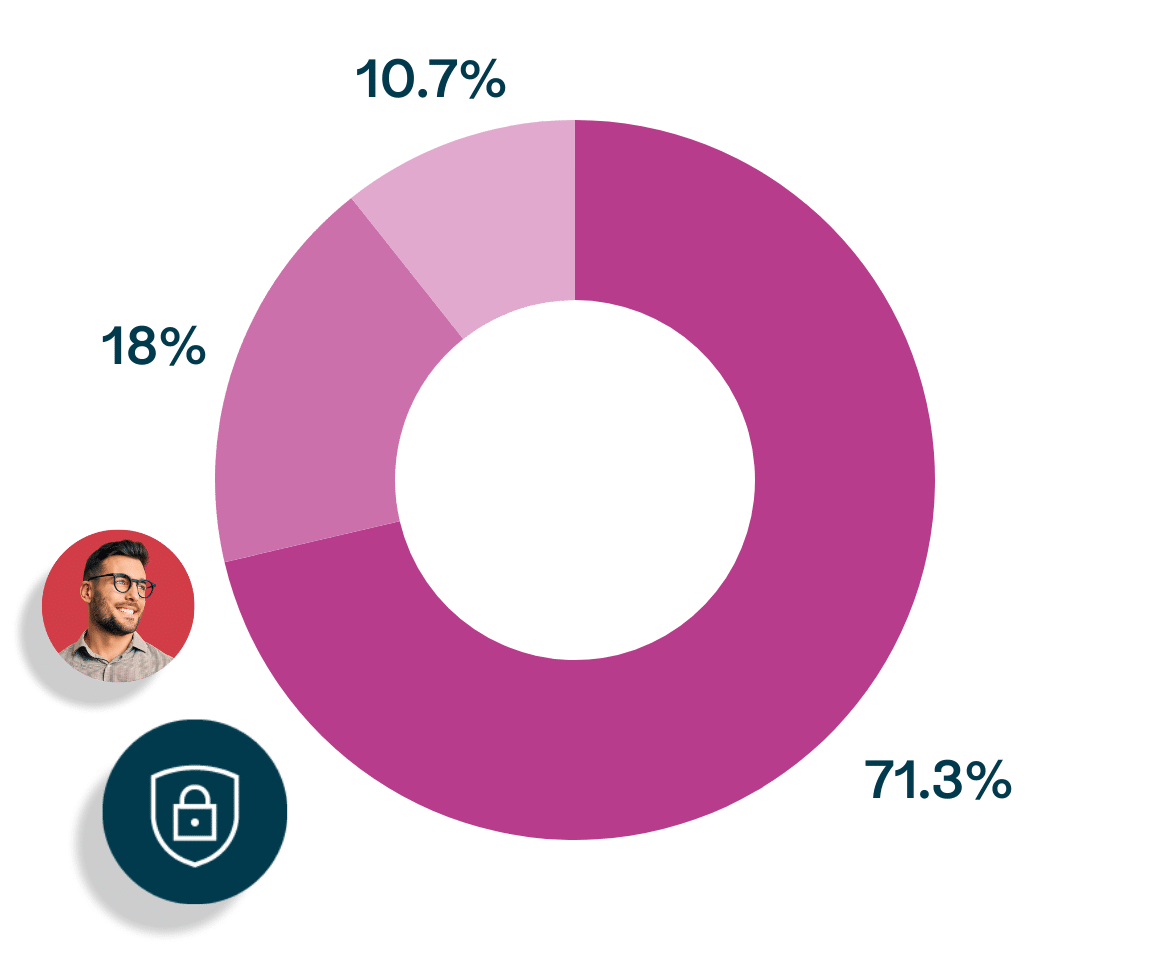
Manual contracts do not guarantee compliance
Contract storage is often not centralized across organizations. While 71.33% of businesses store all contracts in a central system, 18% manage contracts separately by department, and 10.67% are unsure of how contracts are stored at all.
This lack of centralization increases the complexity of managing compliance, as it becomes harder to guarantee that personal data is handled and deleted in line with GDPR requirements across various departments and systems.
Combat your pain: Store your contract data in a GDPR-compliant system
With a secure, cloud-based system like Oneflow, businesses can store contracts in a way that complies with GDPR. Sensitive data is encrypted, stored safely, and can be deleted upon request. Automatic record-keeping and auditing features make it easy to demonstrate compliance in the event of an audit, providing peace of mind that your business is meeting legal requirements.
The friction of switching between multiple systems
70.67% of respondents use 2-3 different tools to manage the entire contract lifecycle.
In many organizations, the contract process is still fragmented. Teams often switch between multiple tools to create, review, and sign contracts. 70.67% of respondents use 2-3 different tools to manage the entire contract lifecycle, and 20.33% use just one. This results in wasted time and lost momentum, especially for sales teams that need to close deals quickly.
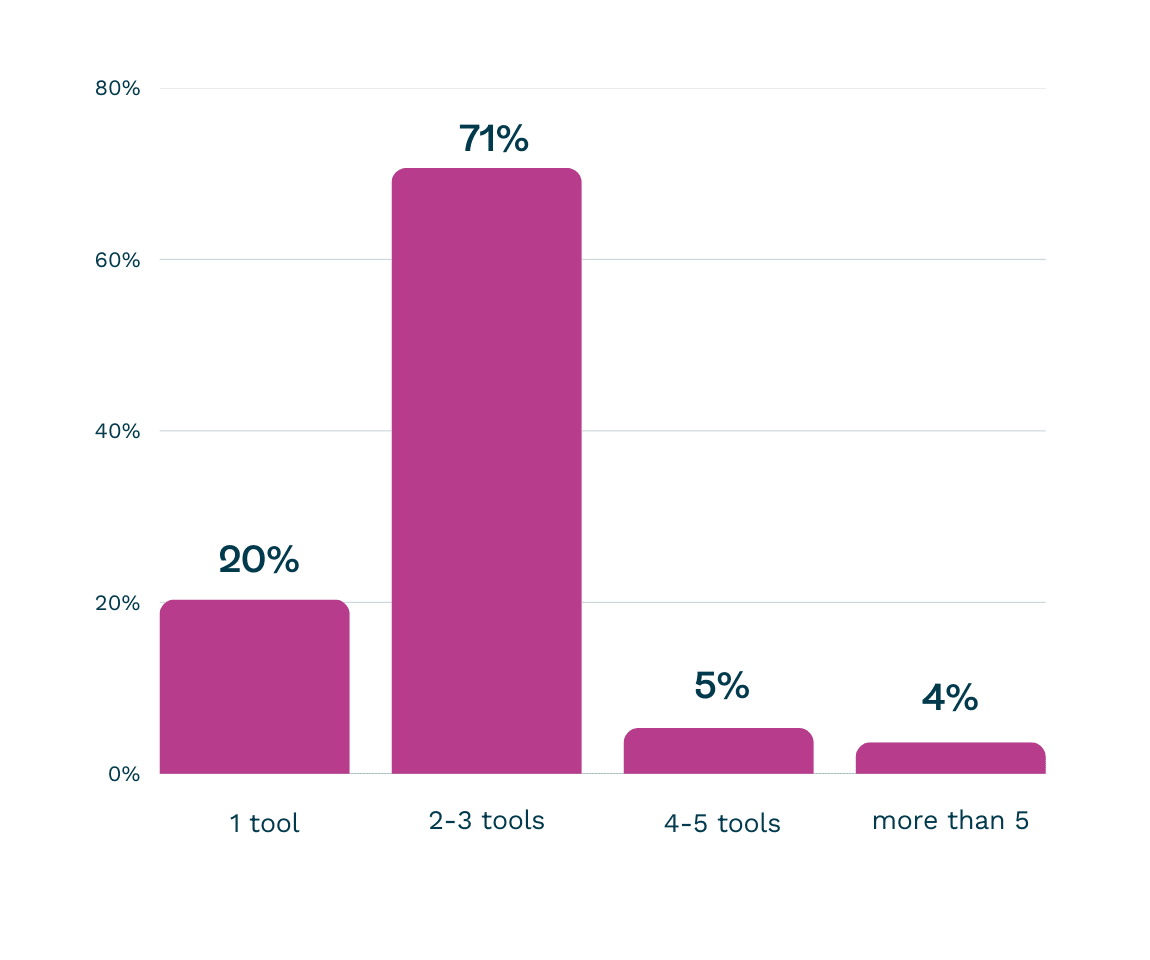
How many different tools or software do you use to manage the entire contract lifecycle (from drafting to storage)?
Switching between systems increases the risk of data misalignment. For example, when contract data is stored in multiple locations—like CRM systems, email threads, or local drives—there is always a risk that the data will be inconsistent or outdated.
Using multiple tools causes synchronization issues
According to our survey, 37% of businesses report that their average contract process takes less than one week, while 39.67% take 1-2 weeks.
In addition to the inefficiencies, businesses face synchronization issues when contract data is scattered across different tools. This fragmentation creates more opportunities for human error and delays the contract approval process.
When businesses use multiple systems for different stages of contract management, it becomes difficult to make sure that all teams are aligned and working off the most up-to-date version of a contract. As a result, the entire process takes longer than necessary.
The time it takes to complete a contract process can be a clear indicator of the inefficiencies caused by switching between systems. According to our survey, 37% of businesses report that their average contract process takes less than one week, while 39.67% take 1-2 weeks.
However, 16% of businesses take between 2-4 weeks, and 7.33% say the process extends to more than 4 weeks. These delays are often a direct result of inefficiencies and a lack of synchronization caused by the use of multiple tools.
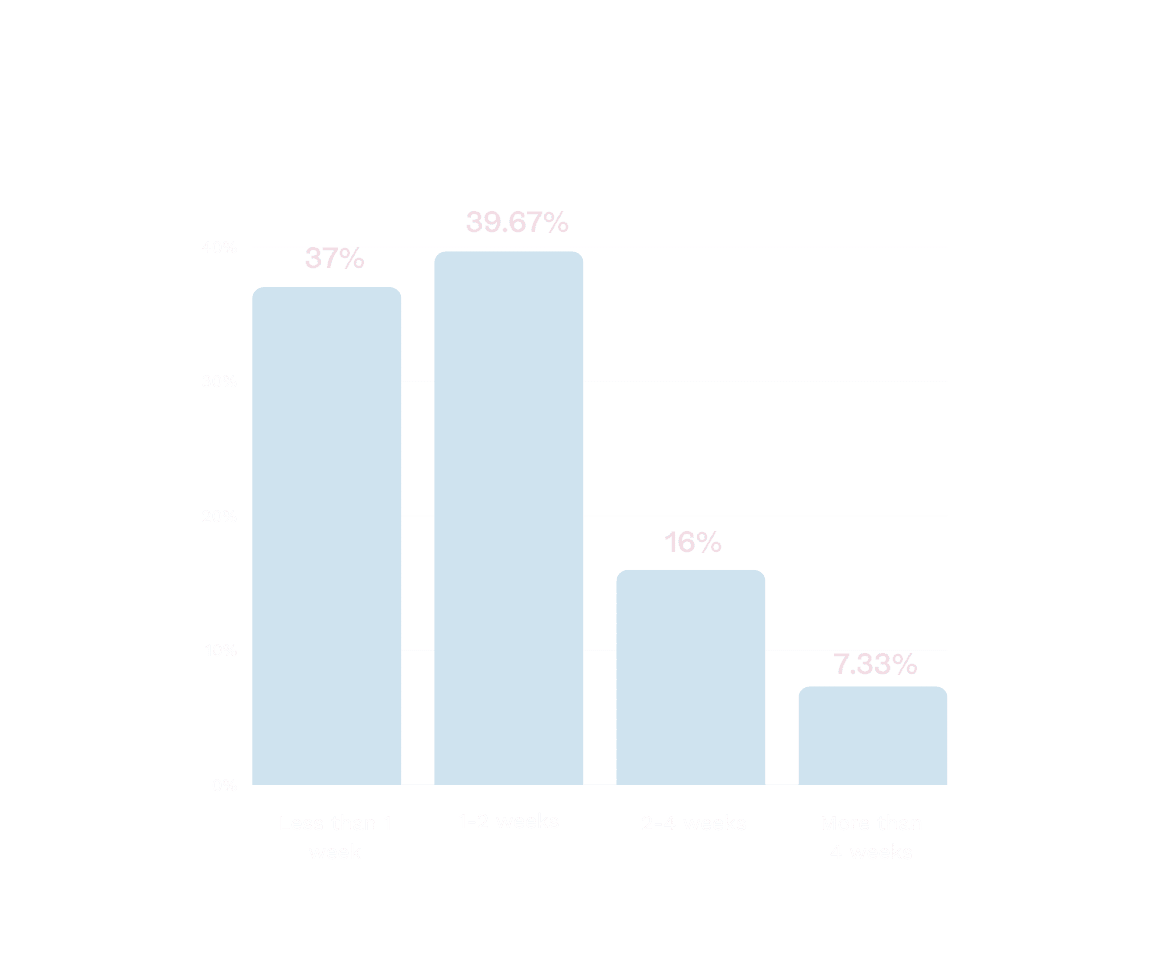
How much time does the average contract process take, from creation to final storage?
Combat your pain: Draft, negotiate, and sign contracts in one place
A contract management software centralizes the entire contract lifecycle in one platform. Sales teams can draft, negotiate, and sign contracts all within the same tool, allowing them to close deals faster. Automated reminders keep deals on track, while integrations with CRM systems allow data to flow seamlessly, reducing friction and increasing productivity.
By removing the need to switch between different tools, the system reduces administrative overhead and provides a clearer overview of contract status, making it easier to track progress and act faster.