The more collaborative alternative to Docusign

The more collaborative alternative to Docusign

Oneflow vs. Docusign: What’s the difference?
| Feature category | Oneflow | Docusign |
|---|---|---|
| Contract creation | Create branded contracts from reusable templates and dynamic content, with collaboration built in. Standardize how teams create agreements while reducing manual document work. Key features: Dynamic contracts, templates, conditional sections, product tables. | Create agreements with templates, reusable clauses, conditional rules, and data-driven document generation. Advanced document generation can support more complex requirements, depending on the solution and plan. Key features: Templates, clause library, conditional rules. |
| Collaboration & negotiation | Negotiate in one live contract, with changes and comments kept in context as terms evolve. Reduce version confusion and avoid restarting the process when edits are needed. Key features: Real-time collaboration, comments and chat, change tracking, edit after send. | Support document review with comments, tasks, and version comparison; more structured negotiation and playbook-led review can be supported through CLM capabilities. Key features: Comments and tasks, version comparison, playbooks. |
| Approvals & signing | Connect approvals, electronic signing, and collaboration in one continuous contract workflow, so signature is a milestone, not the end of the process. Key features: Approval workflows, signing order, electronic signing, eID signing options. | Manage electronic signing with administrative and access controls. Broader approval routing and lifecycle workflows are available through relevant agreement management and CLM solutions. Key features: eSignature workflows, delegated administration, access controls. |
| Management & governance | Turn signed contracts into useful business information. Find agreed terms, track obligations and key dates, and stay ahead of renewals and follow-ups after signature. Key features: Searchable contract repository, obligation tracking, lifecycle notifications, renewal reminders. | Store, search, retain, and govern agreements, with broader lifecycle management and portfolio visibility available through CLM capabilities. Key features: Agreement repository, audit trails, retention controls, lifecycle management. |
| AI & analysis | Use AI across contract work—from drafting and summarizing content to extracting structured data and reviewing agreements. AI Insights Premium adds a portfolio-wide view, using custom rules and thresholds to surface exceptions and drill down to the relevant clauses. Key features: AI Extract, Write with AI, AI Summary, AI Review, AI Insights, AI Insights Premium. | Use AI-supported agreement review and analysis, including playbooks and tools to support review workflows. Key features: AI-assisted review, playbooks (verify current product names). |
| Integrations & automations | Connect contracts to the systems that run your business. Oneflow supports bi-directional data flows with CRM, HR, and ERP systems, helping keep contract information aligned before and after signature so agreed terms can inform the workflows that follow. Key features: CRM integrations, supported bi-directional sync, API. | Connect signing and agreement workflows to business applications through integrations and APIs. Broader cross-lifecycle automation depends on the solution and configuration. Key features: Business application integrations, APIs, OAuth 2.0, MCP. |
| Admin & security | Support governed collaboration across teams with enterprise-ready access control and compliance foundations. Key features: Role-based permissions, ISO 27001, ISO 9001, ISO 14001, SOC 1 Type 1, SOC 2 Type 1, AES-256 encryption at rest, TLS 1.2 or higher in transit. | Govern users and agreements with enterprise administration, identity and access controls, and security and compliance measures. Key features: SSO, delegated administration, access controls, ISO 27001:2022, ISO 27017:2015, ISO 27018:2019, SOC 1 Type II, SOC 2 Type II, PCI DSS. |
Disclaimer: this comparison is based on data collected in October 2026.















Why teams choose Oneflow over Docusign

Collaborate on live contracts, not static documents
Work directly in a live web-based contract, with changes and comments kept in context throughout negotiation. When terms change, everyone can work from the same current version
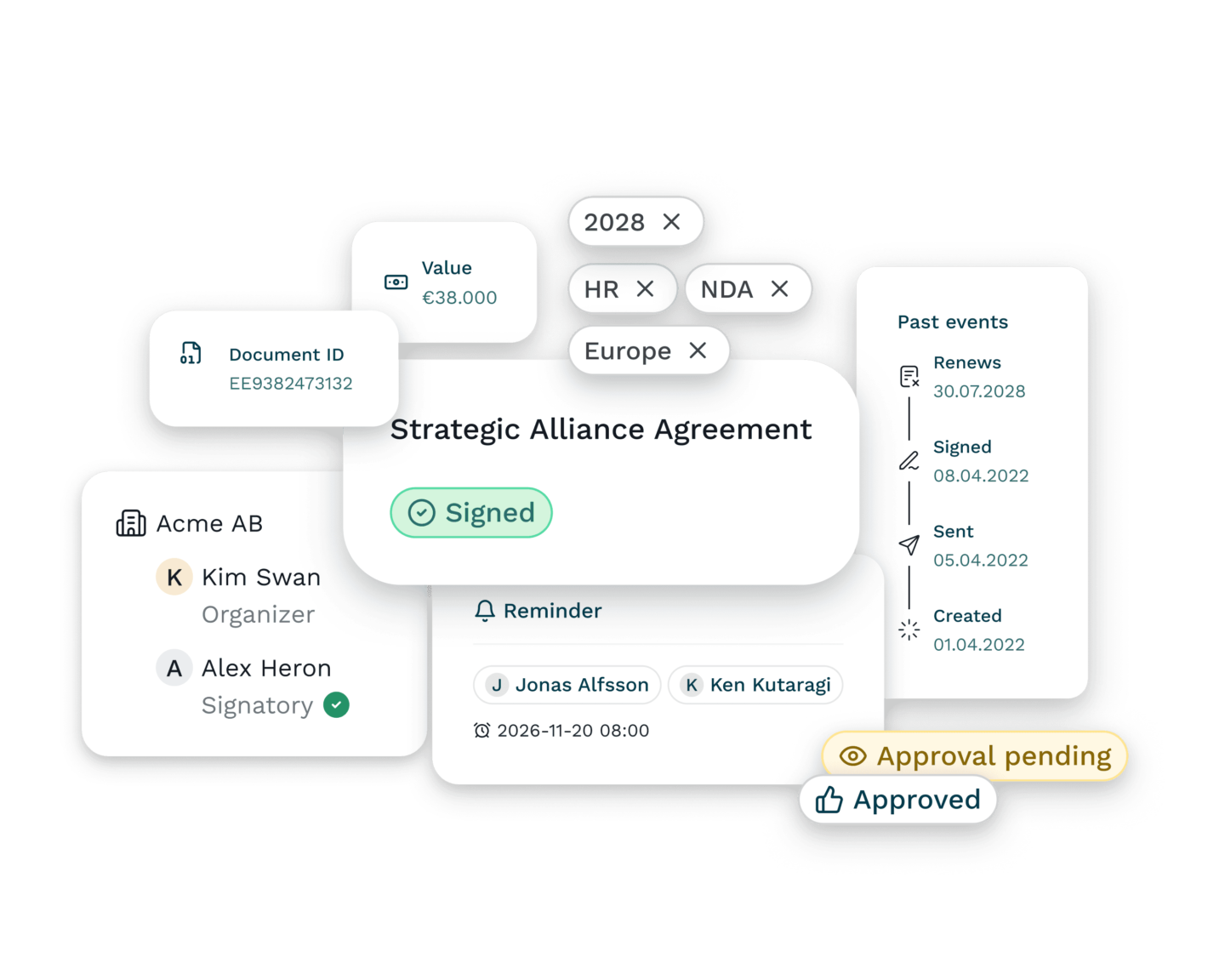
Make signed contracts work for your business
Find key terms, track obligations and renewals, and connect structured contract data to the workflows that follow signature. Give teams the visibility they need to act on what’s been agreed.

Put AI to work across the contract lifecycle
Use AI to draft and summarize content, extract key details, and review contracts against guidelines. With AI Insights Premium, apply custom rules across your portfolio to surface exceptions and drill down to the relevant clauses.

Connect contracts to your business systems
Connect Oneflow with CRM, HR and ERP systems so contract data can flow between business applications and support the workflows that follow signature.
“We previously used a traditional e-sign solution but decided to adopt Oneflow’s contract workflow instead, giving us a far more robust & structured contract process that goes well beyond signing. By bringing contract creation, collaboration, execution & post-sign management into a single platform that can be utilized across multiple departments including Sales, HR & Client Management, we expect to improve efficiency, reduce manual work & gain much better visibility across our contracts & trading partner relationships.”

“Integrated with Salesforce and CPQ, Oneflow makes it super simple to create Offers and Contracts directly from the opportunity with items from the related quote. The HTML format lets you work in the same document instead of uploading new versions for every change before signing.”

“The communication with Oneflow, and Oneflow’s flexibility, throughout the entire customer journey has been one of the bigger differentiators from other similar softwares.”

“There are many e-signing tools integrated with Upsales. But other tools do not have separate Workspaces, to create and manage different types of contracts — sales, management, HR — and can control permissions between the different business areas. This was important to us.”
Read full story
“Oneflow’s strongest USP is clearly the opportunity to make rapid changes to the agreement during ongoing negotiations, without having to withdraw the entire agreement and then send a new one. This saves you an incredible amount of time and allows you to close much faster.”
Read full story
“The fact that Oneflow is 100% digital makes it so simple and flexible. It gives us peace of mind by providing control and a complete overview of our contract process at all times.”
Read full story
“We wanted a service where the sellers could show the agreement when visiting the stores, and quickly send a copy to the customer. Oneflow met all of these expectations. Plus, at the same time, it is a very simple and user-friendly tool for both sales, stores, and me centrally”
Read full story
“The main advantage of Oneflow is that it is simple. Now monitoring is done automatically – we can set up when quotes and reminders will be sent out. So, the customer gets in touch, and we do not waste time chasing people. I see no reason why one wouldn’t use Oneflow. A no-brainer”
Read full story
“Before many people at Volue found themselves bogged down by administrative duties, and it took time away from vital areas of the business, such as product development. But now employees can focus on things like upgrading the product or developing a pitch to clients.”

“This means that everything is collected in HubSpot, which is crucial for us, especially since we collaborate with external consultants. It’s important that we can access all the contract details in one place. With HubSpot as our single source of information, and Oneflow fully integrated into the platform, we can easily find what we need.”

Trusted by thousands to keep their work moving

Built to work with the systems you use














Compliance you can trust
Your contracts hold your most sensitive business information, so we protect them that way. Oneflow is ISO 27001 and SOC 2 certified and GDPR- and eIDAS-compliant, keeping every contract secure and legally binding. Your data is never shared, never used to train external models and never leaves the EU.
 GDPR
 BankID
 ISO 27001
 MitID
 SOC
 eIDAS
 ISO 14001
 ISO 9001
 TLS 1.2
GDPR
BankID
ISO 27001
MitID
SOC
eIDAS
ISO 14001
ISO 9001
TLS 1.2
GDPR
BankID
ISO 27001
MitID
SOC
eIDAS
ISO 14001
ISO 9001
TLS 1.2
Contracts that power your business
- Experience a personalised demo with a dedicated Oneflow specialist.
- See how Oneflow simplifies contract creation, signing and post-sign management.
- Discover how connected contract data reduces manual work and revenue leakage.
- Explore how Oneflow fits into your existing CRM and business workflows.
Contracts that power your business