You know that sinking feeling when you discover a customer was undercharged for months? Or when a deal stalls because someone manually entered the wrong discount?
According to research by MGI, an estimated 42% of companies experience revenue leakage, with businesses losing between 1% to 5% of their annual revenue to these preventable errors.
Quote-to-cash automation offers a way out of this mess. By connecting your sales, finance and operations into one unified workflow, you can close deals faster, eliminate costly errors and actually collect the revenue you’ve earned.
In this article, you’ll learn what quote to cash automation really means, how the process works, why it matters for your bottom line, and which software solutions can help you implement it effectively.
What is quote-to-cash automation?
Quote to cash (QTC or Q2C) automation is the end-to-end digitization and automation of your business processes from the moment you create a customer quote through to payment. Instead of relying on spreadsheets, email chains, and manual data entry across disconnected systems, you can connect your entire sales cycle into a single, streamlined workflow.
Automation eliminates the repetitive tasks that slow down your sales cycle and introduce human error. Your sales team no longer needs to put together quotes manually, finance doesn’t have to re-enter contract details for invoicing, and operations can ensure a smooth process.
This process involves multiple departments working together. Sales and RevOps teams configure products and create quotes. Legal reviews and approves contracts. Finance generates invoices based on signed agreements. Accounting processes payments and recognizes revenue. When these departments operate in silos with separate systems, data gets lost, duplicated or entered incorrectly.
Proposal software and quoting software like Oneflow smooth out business operations, helping you make accurate quotes immediately. Connect your CRM data to make sure you always have current pricing and contact details, and make your contracts a single source of truth, ensuring a healthy cash flow. Your product details, pricing and invoicing data stay aligned throughout the entire sales process, from initial quote to final payment.
Q2C process vs CPQ: Understanding the difference
You’ve probably heard people use “quote to cash” and “Configure, Price, Quote” (CPQ) interchangeably. They’re related, but there’s an important difference.
CPQ software focuses on the front-end of the sales process. It helps your sales reps quickly configure products, apply the correct pricing rules and generate professional quotes. CPQ is incredibly valuable for companies selling complex, customizable products where pricing depends on multiple variables.
Quote to cash automation takes a broader view. It extends across the entire process of the revenue cycle: contract signing, order fulfillment, invoicing, payment collection, and revenue recognition.
Think of it this way: CPQ helps you win the deal faster, while QTC process automation ensures you actually collect the money you’ve earned without errors or delays. You need CPQ when you’re dealing with complex product configurations and variable pricing. You need full Q2C automation when you want to eliminate revenue leakage and create a seamless handoff between sales, legal, finance and operations.
For mid to large businesses, implementing comprehensive quote-to-cash automation with the right software means fewer systems to maintain, better data accuracy and faster time to revenue.
The 4 stages of the quote-to-cash process
Let’s break down each stage of the quote-to-cash workflow and see how automation transforms what used to be a painful, error-prone process into something that actually works.
Configuring product and pricing logic
The first stage is where your sales team configures what you’re actually selling. This includes selecting products or services, determining quantities, adding customizations and applying pricing rules based on factors like volume discounts, customer type, contract length or promotional offers.
Without automation, this stage is a minefield. Sales reps might use outdated price lists, apply unauthorized discounts, or misconfigure products in ways that aren’t technically feasible. They’re often working from spreadsheets or referencing multiple documents to figure out the right price.
With quote to cash automation, your product catalog lives in one place: typically your CRM. Oneflow quoting software keeps your CRM as the single source of truth for product and pricing data. This means no duplicate product catalogs to maintain, no version control nightmares, and pricing that stays consistent across your entire sales organization.
Quoting, negotiating and signing contracts
Once you’ve configured the offer, you need to present it to your prospect, negotiate terms and get their signature. This is where many companies hit a major bottleneck: the PDF.
Traditional PDFs are static documents. If your customer wants to add an additional user, adjust their commitment term, or modify any terms that affect pricing, someone has to create a new file. Then you’re back to square one with approvals and signatures. It’s slow, frustrating for everyone involved and introduces errors every time data gets re-entered.
With proposal management software like Oneflow, which specializes in contract management, contracts become dynamic and editable even after you send them. You can interact with your prospect directly in the file.
Both parties can see changes as they happen, comment directly in the document, and maintain a complete audit trail of who changed what and when. Once everyone’s happy with the terms, electronic signatures get handled in the same interface, complete with signing order: no printing, scanning or tracking down who still needs to sign.
Generating orders and invoices
After the contract is signed, you need to generate an order and create an invoice. In manual workflows, this means someone from finance logs into your system, reviews the signed PDF and re-enters all the relevant data: line items, quantities, pricing, billing schedule, and payment terms.
Each manual data entry point is an opportunity for error.
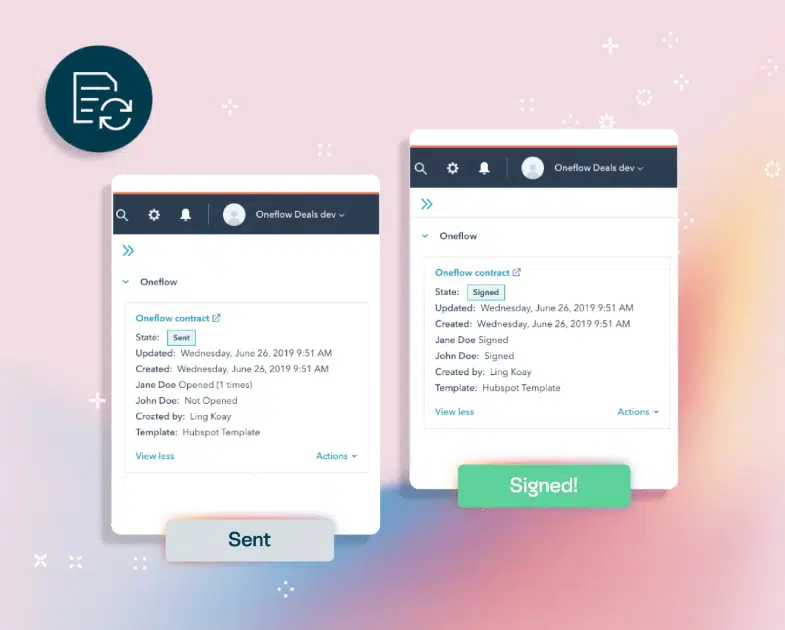
Automated quote-to-cash systems eliminate this problem entirely. Because your contract data lives in a structured format that syncs with your CRM, the invoice generation happens automatically. Your ERP or billing system pulls the exact information from the signed contract—no human interpretation required.
Oneflow’s approach ensures your invoicing data is accurate from day one. Since the contract itself contains structured data fields that sync with your CRM, your finance team receives complete, correct information automatically. This frictionless handoff between sales and finance reduces revenue leakage and eliminates the delays caused by inaccurate invoices.
Processing and collecting payment
The final stage is actually collecting the money. This includes sending invoices to customers, accepting payment through various payment methods, tracking which invoices are paid and which are outstanding, and following up on late payments.
Manual payment collection means someone is checking spreadsheets, sending reminder emails and updating accounting systems by hand. Invoices get missed. Payment failures go unnoticed until the customer calls to complain that their service was shut off. Subscription renewals happen late or not at all.
Quote-to-cash automation connects your invoicing to payment gateways and your accounting systems. Invoices are automatically generated according to the terms of the signed contract. The system tracks payment status in real-time. If a payment fails, automated workflows trigger reminders or alternative payment collection methods. For subscription businesses, renewal invoices are generated automatically based on the contract terms.
Why quote to cash workflow automation matters
The benefits of automating your Q2C process go beyond just making things faster:
- Accelerated sales cycles: Your sales reps spend less time on administrative work and more time actually selling (currently, the time sales reps spend on selling is likely less than 30%!).
- Reduced errors and disputes: Manual processes breed errors and disputes. Someone types $10,000 instead of $100,000. A discount gets applied twice. A product configuration that shouldn’t be possible makes it through to the signed contract. These mistakes cost you money directly (through revenue leakage) and indirectly (through the time spent fixing them and the damage to customer relationships). Quote to cash automation means data flows between systems without manual re-entry.
- Improved cash flow: When your finance team doesn’t need to wait for sales to hand off paperwork, review contracts, and manually enter data, invoices go out immediately after contracts are signed. Some automation platforms also support multiple payment methods and automated payment reminders, which further accelerate collection.
- Enhanced team productivity: Automation eliminates most of the manual tasks for sales reps, finance teams and operations. Your team’s time gets freed up to focus on work that actually creates value: improving your products, customer relationship management, optimizing pricing strategies and continual improvement of your business. Cross-functional alignment is the #1 method of helping sales teams close, according to 81% of reps.
- Better customer satisfaction: Your customers notice the difference between a smooth, professional buying process and a clunky one. When they receive accurate quotes quickly, can negotiate terms through an intuitive interface, and get invoiced the first time correctly, they’re more likely to buy from you again. Dynamic contract management software creates transparency throughout the process, building trust and reducing friction.
- Data-driven decision making: When your entire quote-to-cash process runs through connected automation tools, you can see where deals get stuck, analyze which pricing strategies work best and identify which products sell. You can spot revenue leakage before it becomes a serious problem. This data analysis gives you valuable insights that help you make better decisions about pricing strategies, sales performance, and where to invest your resources.
- Scalability without headcount growth: Quote to cash automation can handle dramatically higher transaction volumes without requiring proportional headcount increases. This means healthier margins as you grow and the ability to expand into new markets without building massive back-office operations first.
Top quote to cash automation software to consider
Let’s look at five solutions worth considering for your quote to cash automation. For a more detailed comparison, check out our comprehensive guide on quote-to-cash software.
Oneflow
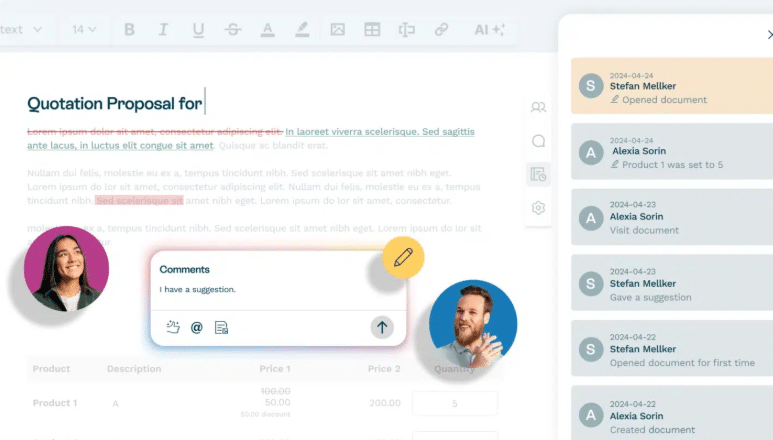
Oneflow is a proposal and contract management platform automating the entire quote to cash process. What sets Oneflow apart is its focus on dynamic, live contracts.
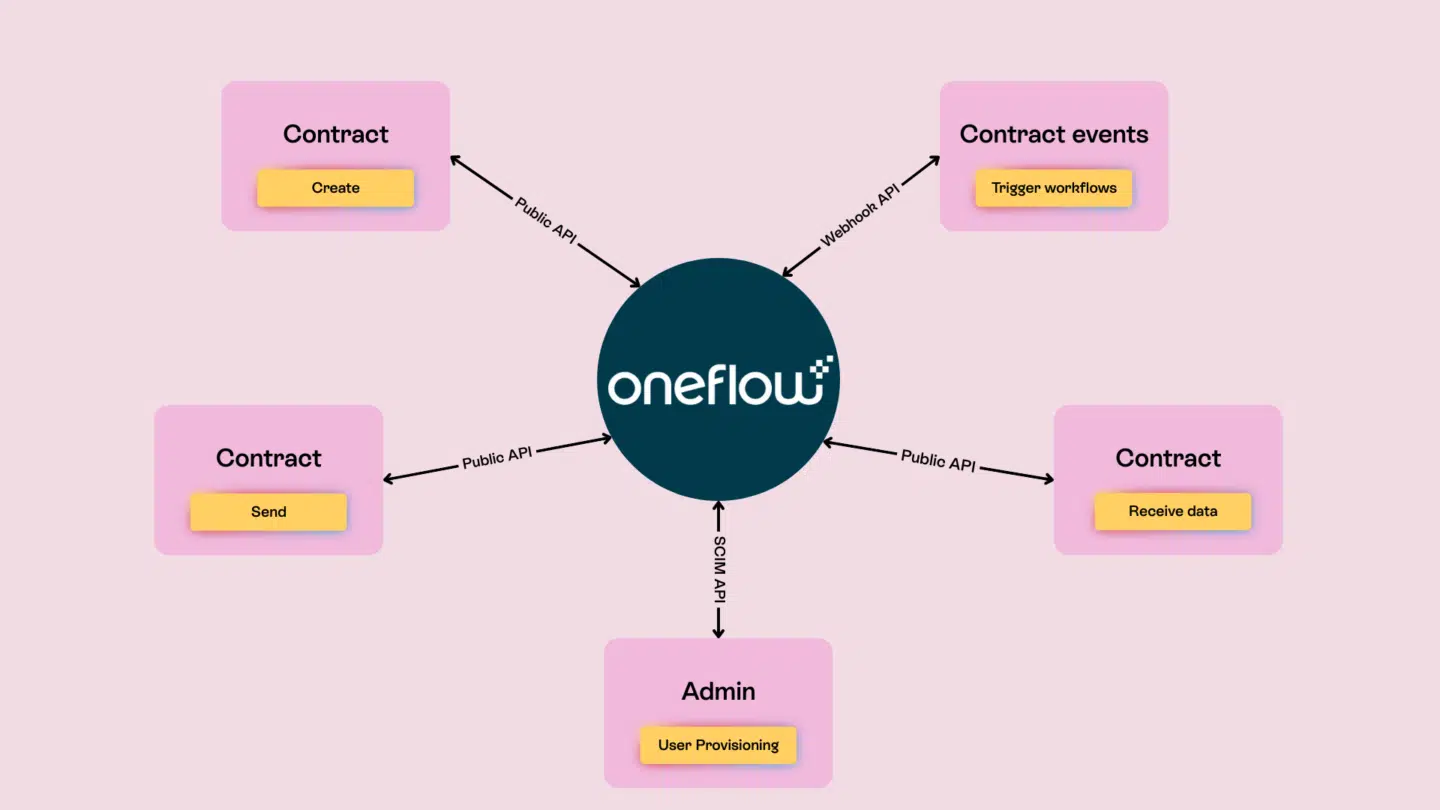
With Oneflow, your contracts sync directly with your CRM (Salesforce, HubSpot, Microsoft Dynamics), keeping product, pricing and invoicing details always aligned. Your prospects can interact with contracts directly (adjusting quantities, selecting options, adding users) and all changes update automatically in your CRM. This two-way sync eliminates the data re-entry that causes revenue leakage.
The platform includes built-in digital signatures, real-time collaboration features, advanced approval workflows with full audit trails, and AI-powered capabilities for compliance and risk analysis. Unlike some heavyweight CLM (Contract Lifecycle Management) tools, Oneflow is easy to use, designed for dynamic contracts, streamlining revenue operations and scaling with your business.
Oneflow delivers three major advantages: First, it keeps your CRM as the single source of truth—no duplicate product catalogs to maintain. Second, its post-signature features provide ongoing visibility with full audit trails, contract linking and searchable digital contracts. Third, it seamlessly integrates with ERP and CRM to ensure accurate data flows automatically.
Try Oneflow to see how dynamic contracts can eliminate revenue leaks and speed up your deal cycles.
Oracle CPQ Cloud
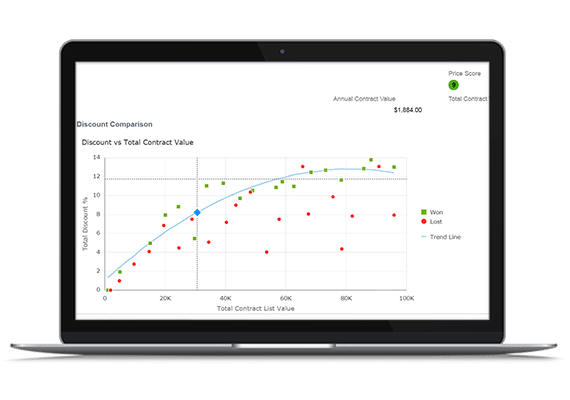
Oracle CPQ Cloud supports the quote stage of the quote-to-cash process, helping large enterprises generate accurate, compliant quotes for highly complex products. It integrates tightly with Oracle’s broader ecosystem, including Oracle ERP and CRM, allowing approved quotes to flow downstream into order management, billing, and revenue recognition.
The platform handles intricate product rules, dependencies, and pricing logic. Guided selling capabilities help sales teams configure valid, optimized deals while enforcing pricing and discount controls—reducing errors that can delay approvals or disrupt downstream processes.
However, Oracle CPQ Cloud does not include native contract lifecycle management. Contract creation, negotiation, and renewal tracking typically rely on separate Oracle CLM tools or third-party solutions. As a result, organizations often need additional integrations to maintain continuity between quoting and contracting within the full quote-to-cash lifecycle.
Oracle CPQ Cloud is best suited for large enterprises with complex offerings. The implementation can be complex and typically requires significant customization. Pricing is generally higher than more focused solutions, but for organizations that need enterprise-scale CPQ integrated with Oracle’s other business systems, it’s a safe choice.
SAP CPQ
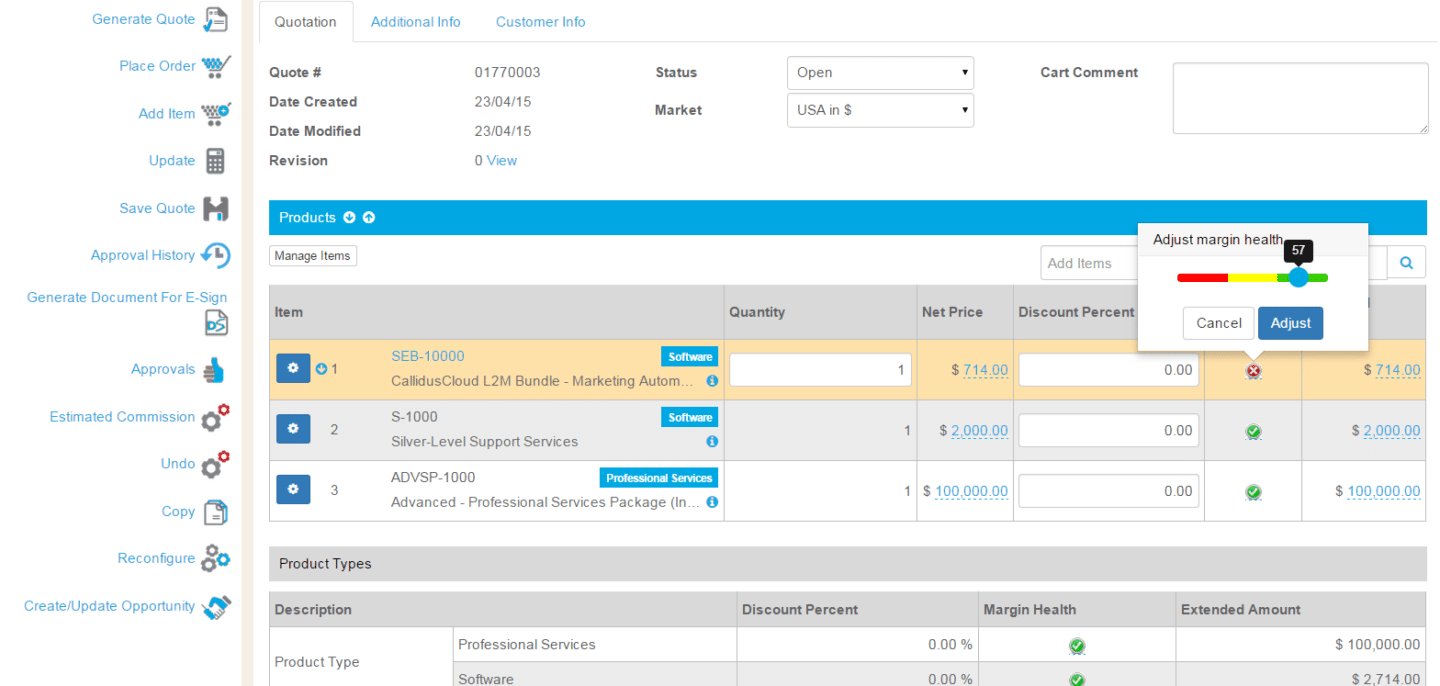
SAP CPQ is more focused on the front end of quote-to-cash automation, enabling sales teams and partners to configure products, apply pricing logic, and generate quotes that align with SAP’s downstream financial and operational systems.
Designed for complex, enterprise sales environments, SAP CPQ supports multi-step approvals, advanced discounting, and AI-driven pricing recommendations. These capabilities help reduce pricing leakage early in the Q2C process and ensure that approved quotes can move efficiently into order fulfillment and invoicing through SAP’s ERP ecosystem.
For organizations selling through indirect channels, SAP CPQ includes partner portals that allow resellers to create quotes within predefined rules—maintaining governance while accelerating deal cycles.
SAP CPQ does not provide full CLM functionality out of the box. Contract generation, negotiation and lifecycle tracking are typically handled via SAP CLM or external contract management platforms, which means end-to-end quote-to-cash visibility depends on integration quality.
Like Oracle CPQ, SAP CPQ is best suited for large enterprises. Implementation requires substantial time and resources. The solution’s strength lies in handling high complexity and scale, but some organizations may find it more than they need.
Maxio
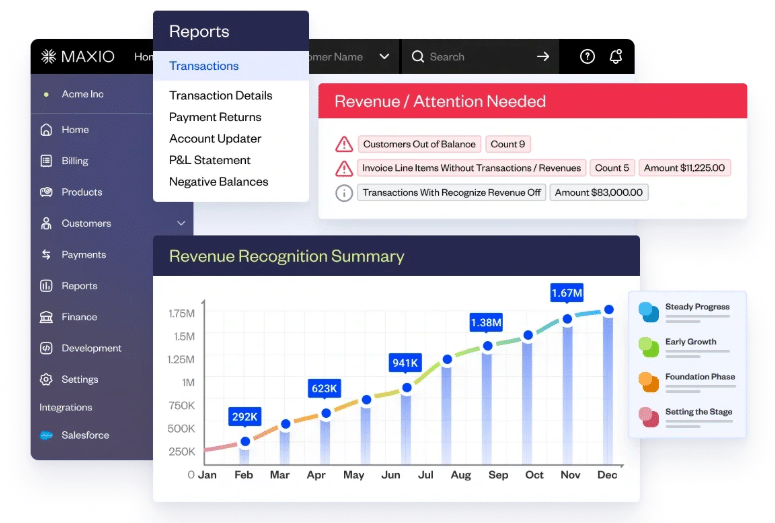
Maxio focuses specifically on B2B SaaS companies and subscription-based businesses. Rather than being just a CPQ tool, Maxio provides subscription management, billing, automated revenue recognition and financial reporting.
The platform handles the unique challenges of subscription revenue: usage-based pricing, mid-cycle upgrades and downgrades, prorated billing and revenue recognition for prepaid subscriptions. It integrates with payment gateways and connects to major accounting systems.
Maxio is ideal if you’re running a SaaS or subscription business and need sophisticated billing and revenue recognition capabilities.
PandaDoc
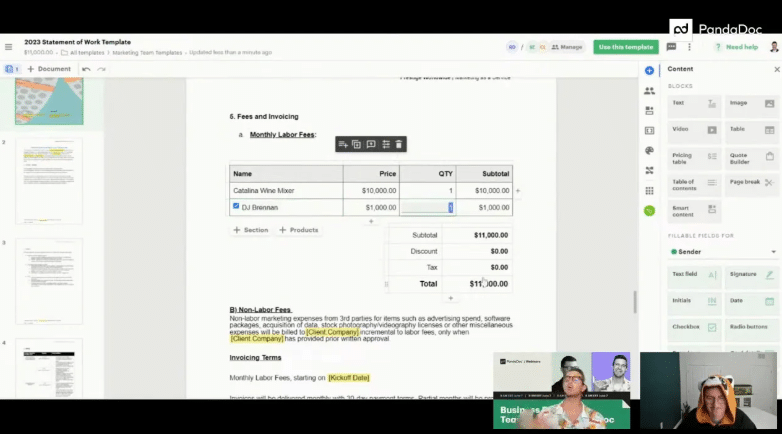
PandaDoc offers document automation and electronic signature capabilities with quote and proposal features. It’s a more accessible solution for small to mid-sized businesses that need to create professional proposals and get them signed quickly.
The platform includes a template library, a drag-and-drop document builder and integrations with popular CRMs. PandaDoc’s pricing is generally more affordable than enterprise solutions.
However, for organizations needing sophisticated contract management or deep CRM integration for true quote-to-cash automation, PandaDoc’s capabilities may be limited. It’s primarily a document creation and e-signature tool rather than a comprehensive Q2C platform. For alternatives, see our PandaDoc alternatives comparison.
Cut your revenue time with Q2C automation
The choice is pretty clear: you can keep losing money to revenue leaks, frustrated sales reps and slow deal cycles, or you can automate your quote to cash process and start capturing the revenue you’ve already earned.
The benefits stack up quickly. Faster sales cycles mean more deals closed. Accurate invoicing means no more revenue slipping through the cracks. Real-time visibility means you can actually make informed decisions about your business. And the productivity gains? Your team will thank you for getting them out of spreadsheet hell.
Oneflow approaches quote-to-cash automation differently than traditional solutions. Instead of creating more systems for your team to manage or locking your data in static PDFs, Oneflow creates dynamic contracts that keep your CRM as the single source of truth. Your deals close faster, your invoicing is accurate, and your revenue operations finally have the visibility they need.
Ready to eliminate revenue leaks and speed up your sales cycle? Try Oneflow and see how intelligent contract automation can transform your business.
FAQs
What is the difference between quote to cash and order to cash?
Quote-to-cash (Q2C) covers the entire sales and revenue cycle from initial quote through payment collection. Order to cash (O2C) starts later in the process, beginning after the sale is made (the “order” part) and focusing on order fulfillment, invoicing and payment collection. Q2C is broader and includes the pre-sale activities like product configuration, pricing and contract negotiation. Both processes overlap in the invoicing and payment stages, but Q2C gives you visibility into the entire customer journey from first contact to final payment.
How long does it take to implement quote-to-cash automation?
Implementation timelines vary widely based on your existing systems, business complexity and the solution you choose. Simple implementations with cloud-based tools like Oneflow can be up and running in a few weeks, especially if you have relatively straightforward product offerings and already use a supported CRM. More complex enterprise implementations involving legacy system integrations, extensive customization, and change management across large organizations might take several months.
What integrations are essential for effective Q2C automation?
The most critical integration is between your quote-to-cash platform and your CRM. This connection ensures customer data, product information and deal details flow seamlessly between systems. Your ERP or accounting system integration is also helpful for order management and invoicing. Payment gateway integration enables automated payment processing. Many businesses also benefit from integrating with their CPQ if they use a separate tool, their contract management system and any industry-specific tools.
What security and compliance features should Q2C automation software include?
Look for platforms that offer encrypted data storage and transmission, role-based access controls that let you limit who can view or edit sensitive information, comprehensive audit trails showing who accessed or modified documents and when, and compliance with relevant standards like SOC 2, GDPR, or industry-specific regulations.
.png?id=40edbc9ee25345a211152388fdcf1fd2)

.png?id=073897979970647cd034d6db96c145de)