Every sale, hire and supplier relationship depends on a contract. Yet in many companies, they’re still treated like admin—essential, yes. But often forgotten right after signing. If yours are scattered across shared drives, buried in email threads or worse yet, locked away in dusty drawers, you lose visibility into the terms, dates and obligations your business depends on.
Neglecting contract management comes at a cost. Research from World Commerce & Contracting found that companies lose an average of 11% of contract value once deals move into delivery and ongoing management, due to small but cumulative gaps in governance, performance management and day-to-day contract oversight.
AI CLM aims to stop that leak. By integrating artificial intelligence into how you draft, review, sign and manage agreements, you bring contracts back to life instead of letting them rot forgotten in storage.
This guide walks you through what AI CLM is, how it works, which teams get the most out of it, what to check before you buy, and how Oneflow applies AI across the contract lifecycle.
What is AI CLM?
AI CLM (AI-powered contract lifecycle management) means applying artificial intelligence across the entire contract lifecycle: contract creation, negotiation, signing, obligation tracking, renewal…
A traditional CLM software manages your contracts from drafting, approval, negotiation, signing, storage and renewal. An AI CLM platform goes further by processing contract content, identifying key terms, and flagging risks, speeding up contract review and improving post-sign management.
And adoption is growing fast. A LegalOn survey found that the share of teams actively using AI in contract review has doubled year over year and nearly quadrupled since 2024.
How AI-driven CLM solutions differ from traditional CLM
Traditional CLM relies on structured fields, manually entered metadata and predefined rules. AI automates this. It can handle tasks like extracting key terms, comparing clauses to standards, and surfacing risks that might normally be missed.
AI CLMs bring three practical benefits:
- Risks become easier to spot early. AI CLM can help teams identify unusual clauses, missing terms or language that doesn’t match your company’s standards. You define those standards first: what counts as acceptable, which legal or compliance requirements apply, and what your company considers risky. Once that guidance is in place, AI flags issues faster, saving you countless review hours.
- Teams can work with contracts more smoothly. A good CLM platform should already make contracts easier for sales, HR, finance, procurement and legal to manage together. AI supports that further. For example, by summarizing contract content, pulling out key terms, and helping people understand where their attention is needed.
- Signed contracts stay useful after storage. After signature, contracts still contain obligations, deadlines, renewal dates, pricing terms and other key data. AI CLM can extract and organize that information. Instead of contracts sitting untouched in storage, they feed reminders, reports, portfolio views and other business systems—allowing teams to stay aligned and make the most use of contract data.
How does AI work inside a contract lifecycle management platform?
Three technologies do the heavy lifting:
Natural language processing (NLP)
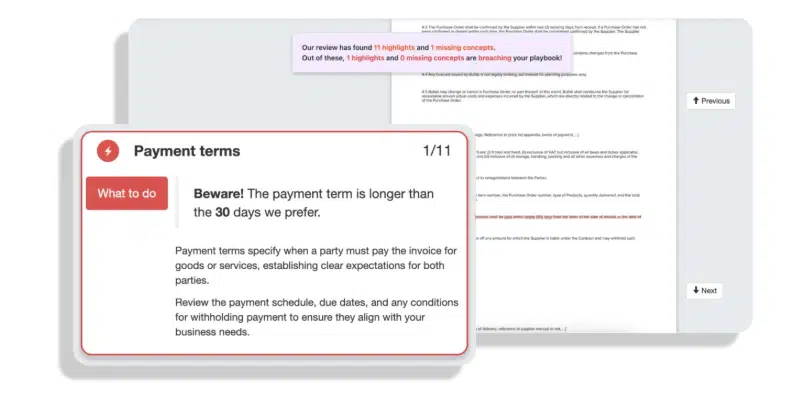
NLP enables software to read, understand and interpret legal language, including complex legal terms and clauses. It goes well past keyword matching, because NLP grasps clause context, it can help catch a payment-terms deviation even when two contracts say the same thing in different wording. This is what fuels contract review, risk detection and relevant clause extraction.
Machine learning and pattern recognition
Machine learning recognizes patterns across large volumes of contract language. When configured around your company’s standard terms, preferred positions and playbooks, it can help spot deviations, flag unusual clauses and support risk scoring based on how your organization works with contracts.
Generative AI for drafting and redlining
The most obvious use case for GenAI is writing. It can turn intake data, business terms or user prompts into suggested contract language. This works best when it’s combined with pre-approved templates, for example, by adapting wording, drafting supporting text or suggesting clauses based on approved playbooks.
AI can also support redlining. When you receive a third-party contract, generative AI can summarize changes, suggest alternative wording and explain how proposed edits compare with your preferred positions.
Remember that GenAI output always needs human review. It can help teams move faster and reduce some manual work, but legal and business judgment still decides what should go into the contract.
Core capabilities commonly found in AI contract management solutions
AI CLM tools can include multiple features, depending on the platform. These are some of the most common capabilities you may come across when comparing solutions.
Intelligent contract drafting and template management
Some AI CLM tools allow you to use generative AI to help draft or adapt contract language based on prompts, intake data or approved playbooks. The CLM platform can use integrations to pull details from connected systems, such as CRM records, HR files or vendor profiles and apply rules to select the right template based on factors like deal value, contract type or jurisdiction. In this setup, AI supports the wording and review process, while the CLM platform handles the structured contract setup.
Automated contract review and risk flagging
The software should check incoming contracts against your standard positions and flag missing clauses, non-standard terms and risky language, with explanations attached. Strong contract review tools can save you countless hours and avoid costly mistakes caused by human error.
Structured approval workflows with human oversight
Structured approval workflows are a CLM staple, not an AI feature—but AI makes them smarter. When AI scores each contract’s risk, the workflow can automatically route high-risk or high-value deals through stricter approval chains, while routine contracts can follow a simpler approval path. Configure approvals by contract type, value or AI-flagged risk, all backed by a clean audit trail, with human sign-off front and center on complex deals.
Post-sign obligation tracking and renewal management
AI processes signed contracts and helps to identify obligations, renewal windows and key dates. The CLM platform then tracks those details, flags automatic-renewal deadlines, and notifies the right people. That way, you don’t miss any important dates.
Portfolio-level analytics and reporting
AI can help turn contract information into structured data that is easier to search, filter and report on. For example, it can extract renewal dates, obligation details, key commercial terms and risk scores from contracts, so teams don’t have to look for that information manually.
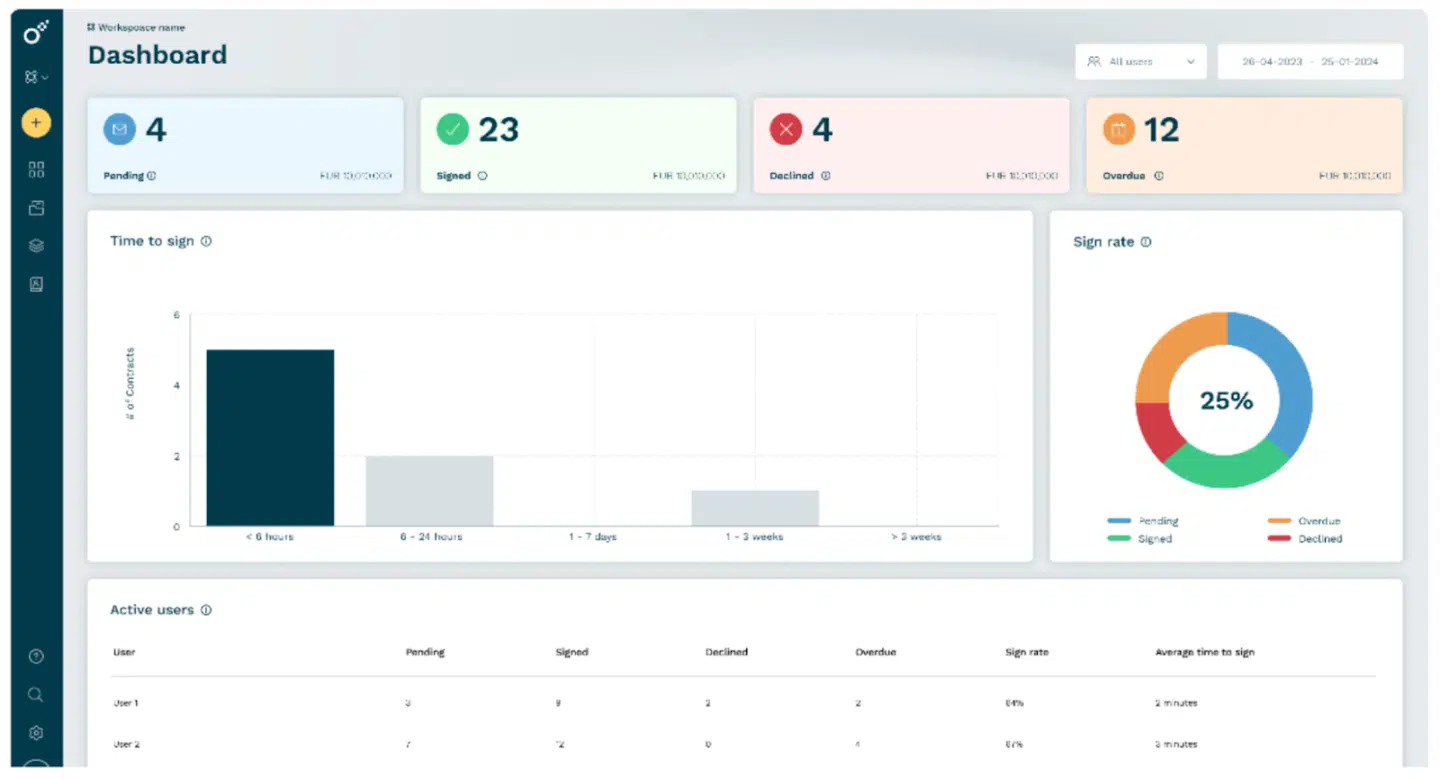
The CLM platform can use that structured data in contracts dashboards and reports. Teams can review upcoming renewals, track obligations, compare risk levels across the contract portfolio, or search for specific terms across agreements. For example, finance could check how much revenue is tied to contracts renewing next quarter without manually opening and reviewing each agreement.
Which teams benefit from AI solutions in CLM, and how
Almost every department comes into contact with contracts, but they each benefit differently from an AI CLM:
- Sales and RevOps. AI CLM can suggest contract language from approved templates and route contracts to the correct approval workflows based on setup rules. For RevOps, AI can help surface patterns across the contract portfolio, such as recurring approval bottlenecks. That gives the team better visibility into where sales contracts slow down, where terms often change, and where the process may need improvement.
- Finance. AI can extract and interpret commercial terms out of executed agreements. No more digging through contracts for payment terms, pricing tiers, renewal dates or usage-based billing conditions. AI identifies those terms and numbers and makes them easy to review and send to other systems to issue correct invoices.
- HR. In HR, AI can help review and manage employment language at scale. It can summarize offer letters, employment agreements and amendments, flag missing or inconsistent terms and surface documents that need legal review. AI CLM makes juggling hundreds of employee agreements far easier for HR contract management.
- Procurement. Procurement teams benefit the most when AI analyzes supplier agreements. It can surface renewal dates, termination rights, pricing commitments, service levels and liability limits, flag odd clauses and surface contracts that need renegotiation before a key deadline.
- Legal. Legal teams get the clearest value from AI in contract review and risk analysis. It can help check drafts against approved templates, legal playbooks and preferred positions before they are sent out. For incoming third-party contracts, it can help flag missing clauses, non-standard terms, risky language and proposed changes that need closer review. It can also summarize redlines and suggest fallback wording based on approved guidance.
This provides better visibility for GCs and Legal Ops leaders across the entire contract portfolio. They can see which risks come up most often, which clauses are frequently negotiated and where the business may need clearer templates, better fallback positions or extra training.
What to look for when evaluating AI CLM software
- What happens to your contract data? AI CLM handles sensitive commercial, legal and personal data, so the first question you should ask is not just what the AI can do, but how the platform processes and protects that data. Check with the provider where contract data is stored, whether it is sent to third-party AI models, whether it’s used to train external models and what controls exist around retention, access, encryption and audit trails.
This matters even more in regulated industries. Sending raw corporate contract data to open cloud models may create problems with data retention rules, confidentiality obligations, GDPR, industry-specific compliance requirements or internal security policies. Look for a vendor that can clearly explain its AI architecture, data processing terms, security certifications and compliance safeguards before you trust it with your contract portfolio. - Depth of system integration. An AI CLM that can’t connect to your CRM, ERP and HR systems is just another silo. Look for reliable ways to connect contract data with the business systems your teams already use, whether through native two-way integrations, a well-documented API, or both. The strongest contract management software keeps contract data moving between systems automatically while supporting security, governance and compliance requirements.
- Cross-functional scope. Ask whether the platform serves only legal teams or every team that touches contracts. A legal-only CLM forces sales teams, HR and finance into workarounds or separate tools and silos.
- Pre-sign and post-sign in one platform. The best AI CLM platforms cover the entire contract lifecycle (contract initiation, negotiation, signing, storage, obligation tracking, renewal) without switching between systems.
- AI on live, structured data, not scanned PDFs. AI output is only as good as the data feeding it. Look for platforms that store contracts as structured, dynamic data so insights rest on current, accurate information.
- Compliance and security. European organizations, especially, should confirm GDPR compliance, eIDAS-qualified signatures where required, ISO certifications and clear data residency. AI CLM handles sensitive legal and business data—you can’t afford security breaches.
- Adoption and usability for non-legal teams. If a salesperson requires IT or legal involvement every time they need to create or update a contract, adoption drops. Look for self-service generation and an interface that doesn’t demand training to finish a basic task.
How Oneflow’s platform and AI transform CLM
Oneflow brings AI into a broader CLM platform built for the teams and systems that work with contracts every day. Instead of treating agreements as isolated files, Oneflow helps keep contract data connected across creation, collaboration, signing and post-sign management. Our AI features, including AI Review, AI Extract, AI Summary and Write with AI, reduce manual work and make contract information easier to review, use and act on.
What that looks like in practice:
- Oneflow’s AI Review feature lets teams analyze contracts for risks, deviations and compliance issues before they become bigger problems. It helps users understand where attention is needed, whether they are reviewing a single agreement or a wider contract portfolio.
- AI Extract speeds up contract import by automatically extracting important details from imported agreements. Teams can capture information such as participants, contract duration and sign date with a single click, reducing manual work when bringing contracts into Oneflow.
- With AI Summary, users can get a clear overview of a document instead of reading the full contract from top to bottom. You can also ask for specific details, such as dates, financial terms, obligations or other information they need to act on.
- Write with AI helps draft, rewrite, edit, summarize and translate contract-related text directly inside the Oneflow contract creation process. That helps teams move faster when preparing agreements, improving wording, creating invitation messages or adjusting contract content during collaboration.
Together, these AI capabilities reduce the time people spend reviewing contracts, searching for details, copying metadata, rewriting contract language and figuring out what needs attention next.
Beyond its AI features, Oneflow also supports the wider CLM process around them, from contract creation and collaboration to signing, renewals and reporting:
- Dynamic contracts: Contracts stay editable after creation, so teams can update terms during negotiation without creating a new PDF version each time. With two-way CRM sync, pricing, counterparty and product details can stay aligned with the systems teams already use.
- Pre-sign and post-sign in one place: Teams can manage template-based contract creation, approval workflows, e-signing, obligation tracking, renewal alerts and portfolio analytics in the same platform.
- Native integrations: Integrations with Salesforce, HubSpot, Microsoft Dynamics, Pipedrive, Teamtailor and HiBob help sales, HR and procurement teams work with contracts from the tools they already use every day.
- Compliance and security: Oneflow is GDPR- and eIDAS-compliant and ISO-certified, with European regulatory requirements built into the platform.
The result is an enterprise contract management approach that keeps contract data connected to your CRM and brings AI-supported contract intelligence to the whole business. To see how this could work in your own contract process, book a Oneflow demo and walk through your setup with our team.
The future of AI CLM is cross-functional, and it’s already here
AI CLM is the infrastructure that makes contracts useful across the whole business.
The move from reactive to proactive contract management is the foundation. When the system flags renewal windows, key obligations or risky clauses earlier, teams have more time to review terms, involve the right stakeholders and decide what action to take before deadlines or issues become urgent.
Cross-functional coverage beats any single AI feature. A brilliant clause-extraction model trapped in a legal-only tool helps one department. Wire that same model into sales, finance, HR and procurement, and it helps the entire company.
Connected contract data compounds over time, too. When contract details such as renewal dates, pricing terms, billing conditions and obligations are captured in a structured way and kept aligned with systems like CRM and finance tools, teams can report on them more accurately and reduce manual re-entry. That also gives AI features better source data to work from, which can improve summaries, searches and risk analysis.
Companies that keep treating contracts as isolated files will keep bleeding revenue, time and competitive advantage to the ones treating them as connected intelligence. The tools to make the switch are now available. Book a demo and see what the connected approach does in your own environment.
FAQs
Is AI CLM secure and GDPR compliant?
A well-built AI CLM platform should offer GDPR compliance, ISO certifications such as ISO 27001, encryption in transit and at rest, role-based access controls, and clear data residency options. European organizations may also need eIDAS-qualified signatures. For example, Oneflow is GDPR- and eIDAS-compliant and ISO-certified. Always confirm whether the vendor’s AI trains on your contract data and whether you can opt out.
Can AI CLM integrate with CRM systems like Salesforce and HubSpot?
Yes, and the good ones do it natively. Look for two-way integrations rather than one-directional API hooks that need custom dev work. Oneflow offers native two-way sync with Salesforce, HubSpot, Microsoft Dynamics and Pipedrive, keeping contract and CRM data automatically aligned.
How long does it take to implement an AI CLM?
Implementation time varies depending on the platform, the number of integrations, the approval setup, and the amount of historical contract data you migrate. Lightweight, user-friendly platforms may be ready in days or a few weeks, while heavily customized enterprise systems can take several months. Tools designed for self-service are often easier to roll out because business users can start creating and managing contracts with less day-to-day support from IT or legal.
How does AI-powered contract management reduce contract risk?
AI contract management reviews incoming contracts against your standard positions and flags missing clauses, non-standard terms, and risky language with explanations. It also tracks contract obligations and renewal deadlines after signing, so commitments don’t slip by unnoticed. At the portfolio level, AI surfaces risk patterns that stay invisible when you review agreements one at a time. Simply put: AI catches issues proactively instead of after they’ve already cost you, while final judgment stays with a human.
.png?id=40edbc9ee25345a211152388fdcf1fd2)

.png?id=073897979970647cd034d6db96c145de)